Cloud migration is no longer just a technical project. For many organizations, it is a strategic business decision that affects cost, performance, security, modernization, scalability, and long-term innovation.
When enterprises begin planning a move to Microsoft Azure, two names often come up: Azure Migrate and Dr. Migrate.
At first glance, they may sound like competing tools. In reality, they serve different but complementary purposes. Understanding the relationship between them can help organizations plan smarter migrations, reduce risk, and create a stronger business case for moving workloads and databases to the cloud.
The Simple Explanation
Azure Migrate is Microsoft’s official migration hub for discovering, assessing, planning, and executing migrations to Azure.
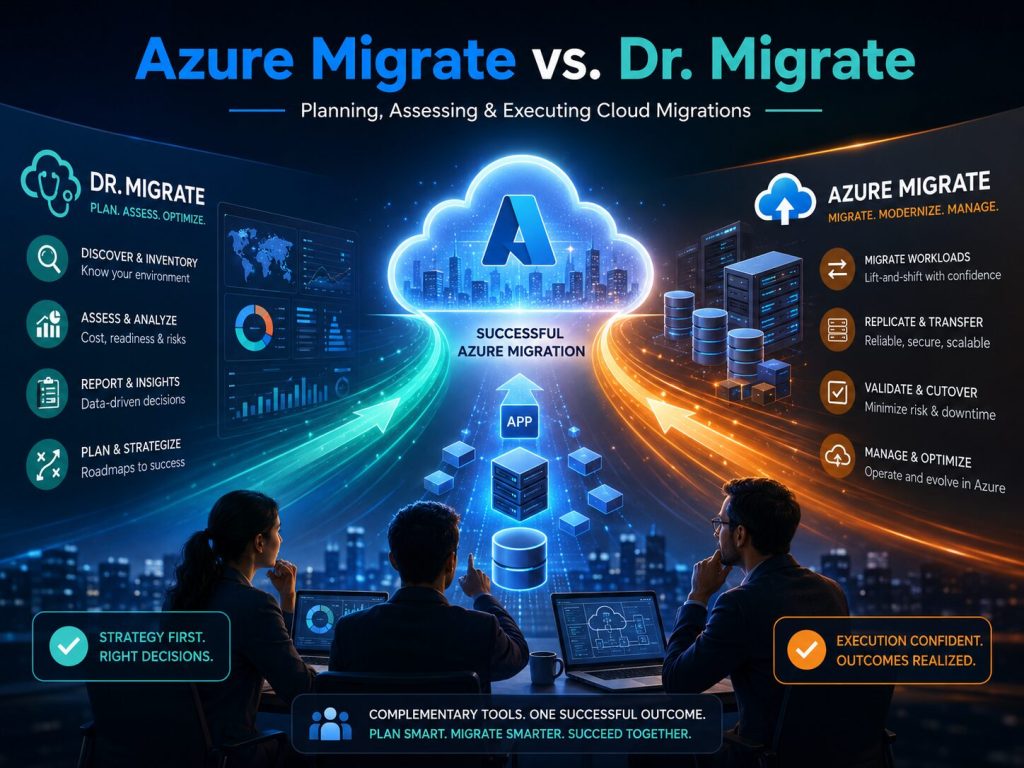
Dr. Migrate is an AI-assisted migration assessment and planning accelerator often used in partner-led engagements to create deeper insights, executive-ready reports, modernization recommendations, cost analysis, and migration roadmaps.
In simple terms:
“Azure Migrate helps you assess and move workloads to Azure. Dr. Migrate helps you better understand, justify, prioritize, and plan the migration journey.”
The two are not enemies. They are better viewed as partners in a successful cloud migration strategy.
What Is Azure Migrate?
Azure Migrate is Microsoft’s native platform for helping organizations discover, assess, and migrate workloads to Azure.
It supports a wide range of migration scenarios, including:
- VMware virtual machines
- Hyper-V virtual machines
- Physical servers
- SQL Server databases
- Web applications
- Workloads from other cloud providers
- Application modernization paths into Azure services
Azure Migrate helps technical teams understand what they currently have, whether those workloads are ready for Azure, what Azure resources may be required, and how the actual migration can be performed.
Key Benefits of Azure Migrate
1. Microsoft-Native Migration Hub
Azure Migrate is built by Microsoft and integrates directly with Azure services. This makes it a natural starting point for organizations that want a Microsoft-supported migration path.
It acts as a central hub where teams can organize migration projects, run assessments, and coordinate migration execution.
2. Discovery and Inventory
Before moving anything to the cloud, you must understand what you have.
Azure Migrate can discover servers, applications, databases, dependencies, and utilization patterns. This helps organizations avoid one of the biggest migration mistakes: moving workloads without a complete understanding of the current environment.
3. Readiness Assessment
Azure Migrate helps answer critical questions such as:
- Can this workload run in Azure?
- What Azure service is the best target?
- Are there compatibility concerns?
- What changes may be required before migration?
- What would the estimated Azure cost be?
This is especially valuable for infrastructure and database teams trying to determine whether workloads should move to Azure Virtual Machines, Azure SQL Database, Azure SQL Managed Instance, App Service, AKS, or another Azure service.
4. Cost Estimation and Sizing
One of the strongest features of Azure Migrate is performance-based sizing. Instead of simply matching on-premises server sizes to equivalent Azure VM sizes, Azure Migrate can use utilization data to recommend more realistic Azure configurations.
This can help reduce overspending and improve the accuracy of cloud cost planning.
5. Actual Migration Execution
This is where Azure Migrate becomes especially important.
Azure Migrate is not only an assessment tool. It can also help perform the migration itself through integrated Microsoft migration services and partner tools.
For organizations ready to move workloads into Azure, Azure Migrate is usually the operational tool that supports the technical execution.
What Is Dr. Migrate?
Dr. Migrate is a migration assessment and planning accelerator designed to help organizations and Microsoft partners quickly analyze an environment, identify opportunities, build migration plans, and create business-ready recommendations.
Where Azure Migrate focuses heavily on Microsoft-native discovery, assessment, and execution, Dr. Migrate focuses more on accelerating insight.
It helps translate raw infrastructure and workload data into a more complete story:
- What should move?
- What should be modernized?
- What should be retired?
- What will it cost?
- What savings may be possible?
- What migration waves make sense?
- What does the executive business case look like?
Key Benefits of Dr. Migrate
1. Faster Assessment and Planning
Enterprise environments can be complex. A large organization may have hundreds or thousands of servers, multiple database platforms, legacy applications, dependency chains, and unclear ownership.
Dr. Migrate helps accelerate the assessment process by organizing collected data into actionable insights. This can shorten the time required to move from “we are thinking about migrating” to “we have a clear migration roadmap.”
2. Executive-Ready Business Case
Technical assessments are important, but executives usually need a different kind of output.
They want to understand:
- Why should we migrate?
- What is the financial impact?
- What risks are involved?
- What business benefits can we expect?
- How soon can we realize value?
- Which workloads should move first?
Dr. Migrate can help produce polished reports and business-case materials that are easier for leadership teams to understand.
3. Modernization Recommendations
One of the biggest mistakes in cloud migration is assuming that everything should be lifted and shifted exactly as it is.
Sometimes that is the right move, especially when speed is the highest priority. But in many cases, the cloud creates an opportunity to modernize.
For example:
- SQL Server may be a better fit for Azure SQL Managed Instance.
- A legacy web application may be a candidate for Azure App Service.
- Some workloads may benefit from containers.
- Some systems may be retired instead of migrated.
- Some databases may need refactoring before moving.
Dr. Migrate can help identify these opportunities earlier in the planning process.
4. Migration Wave Planning
A successful migration is rarely done all at once.
Most enterprise migrations happen in waves. Workloads are grouped based on dependencies, risk, business priority, technical complexity, and modernization opportunity.
Dr. Migrate helps support this planning conversation by giving teams a clearer view of how workloads relate to each other and how they may be moved in a logical sequence.
5. Strong Partner-Led Engagements
Dr. Migrate is particularly valuable in consulting, assessment, and partner-led migration engagements.
It gives architects and engineers a way to quickly create a clear, professional, data-driven migration story for the customer. This is especially useful when working with enterprise stakeholders who need both technical depth and business justification.
When Should You Use Azure Migrate?
Use Azure Migrate when your organization is ready to begin technical discovery, assessment, and migration execution.
Azure Migrate is a great choice when:
- You need to inventory your servers and workloads.
- You want to assess Azure readiness.
- You need performance-based sizing recommendations.
- You are preparing to migrate VMware, Hyper-V, physical servers, SQL Server, or web apps.
- You want to execute the migration using Microsoft-supported tooling.
- You want a central place to manage migration projects in Azure.
For many organizations, Azure Migrate is the practical tool used by the engineering team to move from assessment into real migration work.
When Should You Use Dr. Migrate?
Use Dr. Migrate when your organization needs a stronger migration strategy, faster assessment, business-case development, and executive-level clarity.
Dr. Migrate is a great choice when:
- You are still deciding whether or how to migrate.
- You need a migration roadmap.
- You need to present the business case to leadership.
- You want to identify modernization opportunities.
- You need help prioritizing migration waves.
- You are working with a Microsoft partner or consulting team.
- You have a complex enterprise environment with many workloads and databases.
Dr. Migrate is especially useful before the execution phase, when organizations are trying to understand the full impact and opportunity of the migration.
The Best Strategy: Use Both Together
The strongest approach is often not Azure Migrate vs. Dr. Migrate.
The better approach is:
“Use Dr. Migrate to accelerate strategy, business case, and roadmap creation. Use Azure Migrate to validate, assess, and execute the technical migration.”
A practical enterprise migration flow may look like this:
- Discover the environment
Collect information about servers, applications, databases, dependencies, and usage patterns. - Analyze migration opportunities
Identify which workloads should be rehosted, refactored, modernized, retired, or replaced. - Build the business case
Estimate cost, savings, risk reduction, agility benefits, and long-term value. - Create migration waves
Organize workloads into logical groups based on dependencies, priority, and complexity. - Validate technical readiness
Use Azure Migrate to validate sizing, compatibility, and Azure target options. - Execute the migration
Use Azure Migrate and other Azure services to perform the actual workload and database migration. - Optimize after migration
Use Azure monitoring, cost management, security tools, and architecture reviews to improve the environment after cutover.
How The Training Boss Can Help
At The Training Boss, we help enterprise customers plan and execute successful cloud and database migration strategies with confidence.
Our senior architects and engineers can assist with:
- Azure migration strategy
- Database migration planning
- Azure Migrate assessments
- Dr. Migrate analysis and roadmap interpretation
- SQL Server to Azure SQL Database migration
- SQL Server to Azure SQL Managed Instance migration
- SQL Server to Azure VM migration
- Cloud readiness assessments
- Architecture reviews
- Performance and cost optimization
- Migration wave planning
- Post-migration modernization
Whether your organization is just beginning the cloud conversation or already preparing for a major database migration, our team can help you avoid common mistakes and design a path that fits your business goals.
The goal is not simply to “move to the cloud.”
The goal is to move to the cloud the right way: securely, efficiently, strategically, and with a clear return on investment. Reach out to us today