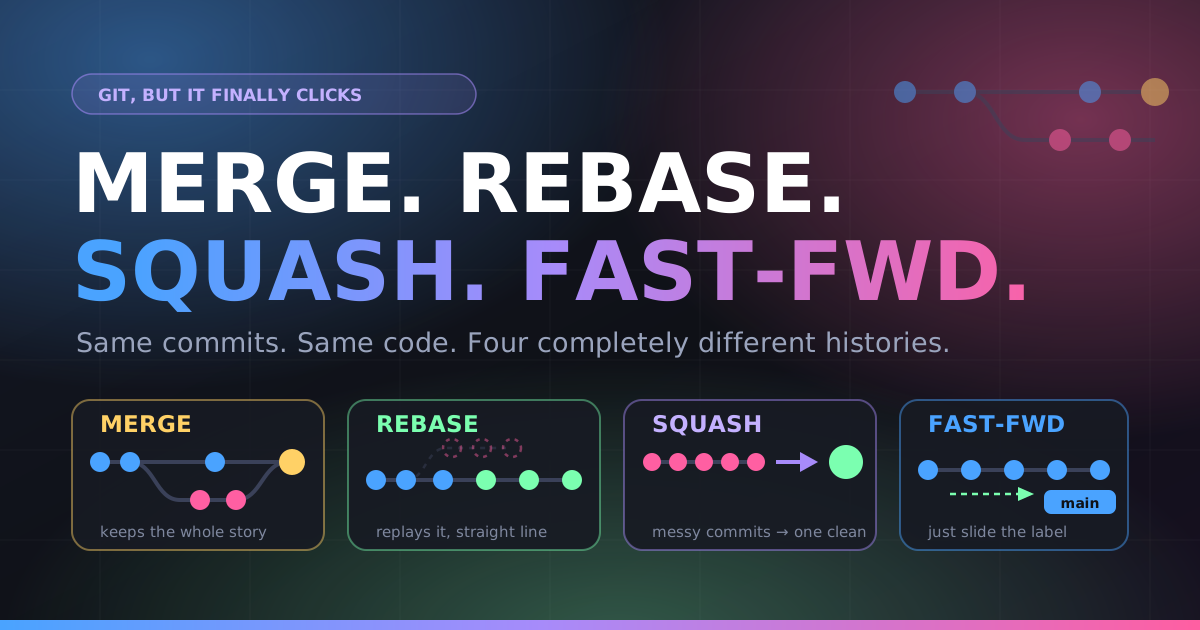
You finished your feature. You type git, then… you freeze. Merge? Rebase? Squash? Does GitHub’s little dropdown with three buttons haunt your dreams?
Here’s the secret nobody tells you: all four options produce the exact same working code. Your files end up identical. What differs is the story your repository tells afterward, and six months from now, when production is on fire at 2 AM and you’re running git bisect, that story is the difference between “found it in 4 minutes” and “found it in 4 hours.”
Let’s build one scenario and run it through all four machines.
Our setup (memorize this, it’s the whole article)
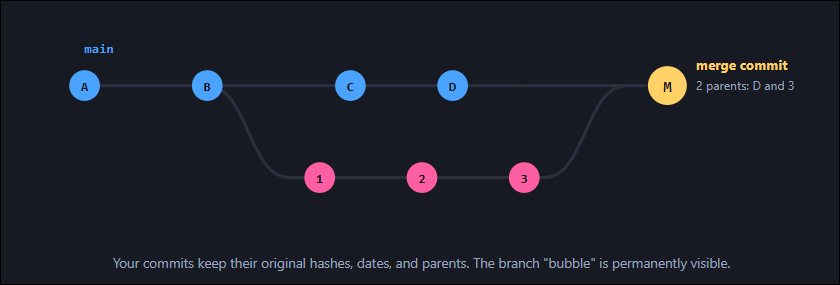
You branch off main at commit B. You write three commits. Meanwhile a teammate ships two commits to main. Now you want your work in.
Merge, the honest historian
“Here’s exactly what happened, warts and all.”
A merge creates a brand-new commit, a merge commit, that has two parents: the tip of main and the tip of your branch. Nothing gets rewritten. Nothing gets moved. Git just ties a bow around both timelines and says “these are now one.”
# from your feature branch, pull main in
git checkout main
git pull
git checkout feature/checkout
git merge main          # bring their changes to you

# or merge your branch into main
git checkout main
git merge --no-ff feature/checkout
What’s --no-ff?
- Nothing is lost: Every commit, timestamp, and parent link is preserved forever. Fully auditable.
- Safe on shared branches: No history is rewritten, so nobody else’s clone breaks.
- Conflicts resolved once: You handle all conflicts in a single sitting, not commit by commit.
- Spaghetti graph: On a busy repo,
git log --graphbecomes railway-track soup.
Rebase, the time traveler
“Let’s pretend you started your work today.”
Rebase takes each of your commits, computes the diff it introduced, and replays it one at a time on top of a new base. The result looks like you branched off D instead of B. One clean straight line. No bubble.
The critical detail: these are not your original commits. Replaying a change creates a new commit object with a new parent, therefore a new SHA. Commits 1 2 3 become 1' 2' 3'. Same content, different identity, like photocopying a page and shredding the original.
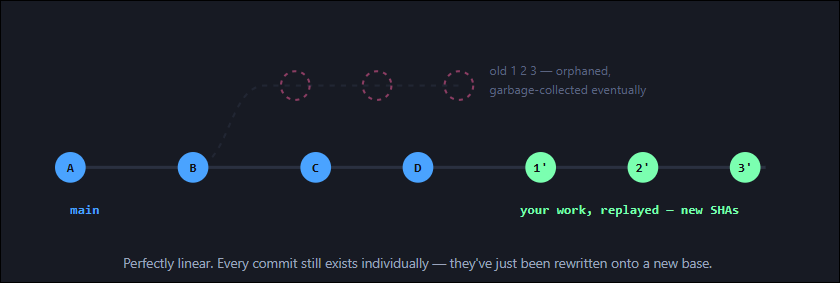
# standard: move my branch on top of latest main
git checkout feature/checkout
git fetch origin
git rebase origin/main

# conflicts? fix files, then:
git add .
git rebase --continue
# panicking? this fully undoes it:
git rebase --abort

# interactive: clean up your own commits before review
git rebase -i origin/main
# pick / reword / edit / squash / fixup / drop — you're the editor now
git pull produces duplicated commits and a mess you’ll be untangling in a Zoom call. Rebase your own unpushed (or solo-branch) work freely. Once it’s shared, merge instead.If you must push a rebased branch that you already pushed and you’re the only one on it, use the safe force:
git push --force-with-lease
# refuses to overwrite if someone else pushed since your last fetch.
# plain --force does not check. use the lease.
main, when you want a clean linear history that git bisect and git log can walk easily, or when tidying your messy WIP commits before opening a PR.Squash, the ruthless editor
“Nobody needs to see ‘fix typo’, ‘fix typo again’, or ‘WHY’.”
Squashing collapses many commits into one. All the changes survive; the individual commits don’t. Your seventeen-commit journey of self-discovery becomes a single tidy commit on main.
Be honest about your branch’s real history:
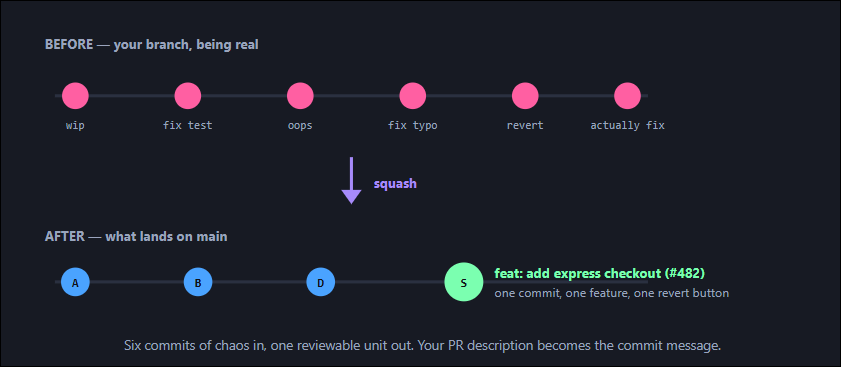
# A) squash-merge a whole branch into main
git checkout main
git merge --squash feature/checkout
git commit -m "feat: add express checkout (#482)"
# note: no merge commit, no second parent — main doesn't know
# the branch existed. delete the branch after.

# B) squash selectively with interactive rebase
git rebase -i HEAD~6
#   pick   a1b2c3  feat: add express checkout
#   fixup  d4e5f6  wip           <- fixup = squash + discard message
#   fixup  g7h8i9  fix typo
#   squash j1k2l3  handle errors  <- squash = keep message, merge it in
- Beautiful main: One commit per feature.
git logreads like a changelog. - Trivial reverts:
git revert <sha>removes the whole feature. One command. - Great for bisect: Every commit on main is a complete, working feature.
- Granularity gone: A 4,000-line squash is a nightmare to blame or bisect inside. Detail is destroyed permanently.
main. Don’t squash a huge refactor where the step-by-step commits are genuinely valuable, or a branch where multiple people’s authorship matters (squashing attributes everything to one committer).Fast-Forward, the label slide
“There’s nothing to combine. I’ll just… move the sign.”
Fast-forward isn’t really a strategy, it’s what Git does automatically when it can. If main hasn’t moved since you branched, your commits already sit directly on top of it. There’s nothing to reconcile. So Git doesn’t create a commit at all. It just slides the main pointer forward.
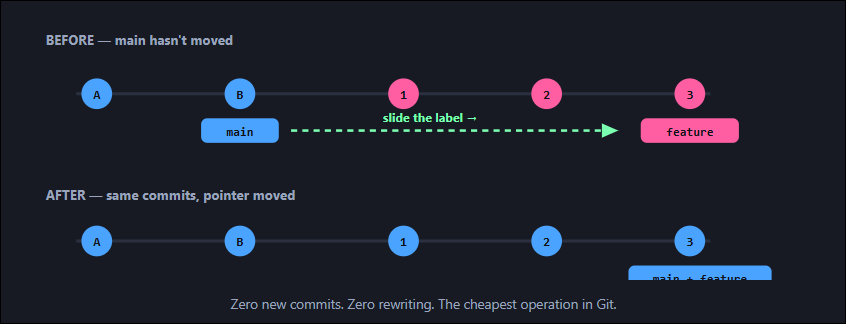
# happens automatically when possible:
git merge feature/checkout
#  Updating 8a3f21..c9e4b7
#  Fast-forward   <-- Git telling you it took the shortcut

# refuse to merge unless it can fast-forward (great in CI):
git merge --ff-only feature/checkout

# make --ff-only your default for pulls — no surprise merge commits
git config --global pull.ff only
main, then fast-forward merge. The rebase makes fast-forward possible; the fast-forward keeps history perfectly linear with no merge-commit noise. This is what GitHub’s “Rebase and merge” button does.--no-ff or squash instead.The cheat sheet
| Strategy | New commit? | Rewrites history? | History shape | Best for |
|---|---|---|---|---|
| Merge | Yes, merge commit, 2 parents | No | Branching, forked, honest | Shared branches, audit trails, release integration |
| Rebase | New copies of your commits | Yes | Linear, all commits kept | Updating your own branch; cleaning up before a PR |
| Squash | One commit replacing many | Yes | Linear, one commit per feature | Noisy WIP branches; “one PR = one commit” teams |
| Fast-forward | No, pointer moves | No | Linear, branch invisible | When the branch is already on top of main |
Decide in five seconds
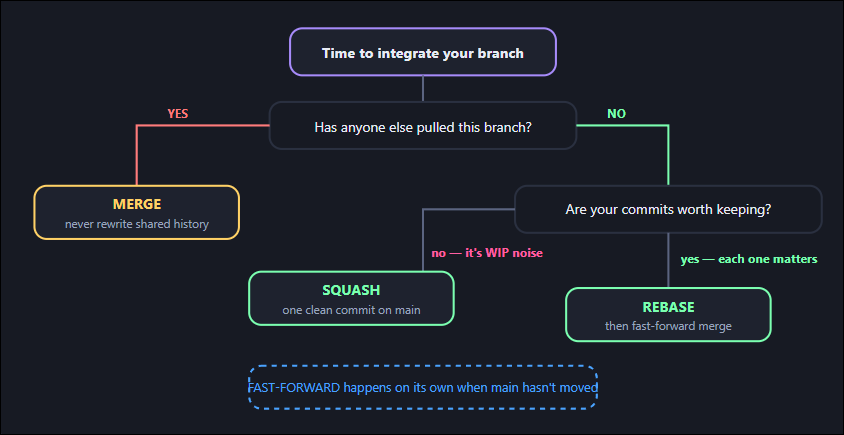
Mapping to GitHub’s three buttons
- Create a merge commit →
git merge --no-ff. Full history + a visible bubble per PR. - Squash and merge →
git merge --squash. One commit per PR. The most popular default at product companies. - Rebase and merge → rebase + fast-forward. Linear history, every commit preserved. Requires disciplined commit hygiene from every contributor.
What I’d actually set up for a team 

Architect hat on. There is no universally correct answer, but there is a reliably good default:
- Squash-merge PRs into
main. It gives you one commit per feature, a linear history, painlessgit bisect, and one-command reverts. It also means contributors don’t have to be commit-message artists — the PR title becomes the commit message, and your review process already enforces quality there. - Rebase your feature branch onto
mainwhile you work — not merge. This keeps your branch’s diff honest and avoids “Merge branch ‘main’ into feature” commits polluting the PR. - Enable “require linear history” in branch protection. It blocks merge commits and enforces the above mechanically instead of via code review nagging.
- Make the exception explicit: long-lived release branches, hotfix backports, and anything with compliance/audit requirements get true merges. Document why.
- Set
git config --global pull.rebase trueacross the team. It eliminates the single most common source of accidental merge commits.
The one rule that outranks all of this: pick one and make it consistent. A repo where everyone squashes is easy to reason about. A repo where everyone merges is easy to reason about. A repo where it depends on who hit the button that day is where debugging goes to die.
Your safety net: git reflog. It records every position HEAD has held for ~90 days, including states you “destroyed” by rebasing. Botched a rebase? git reflog, find the SHA from before, git reset --hard <sha>. In Git, almost nothing is truly gone. Go experiment.
The Training Boss stands ready to engage with your company to help set your team’s productivity and performance at an Enterprise Grade level based on experience and proven architectures and implementation. Reach out to us today.