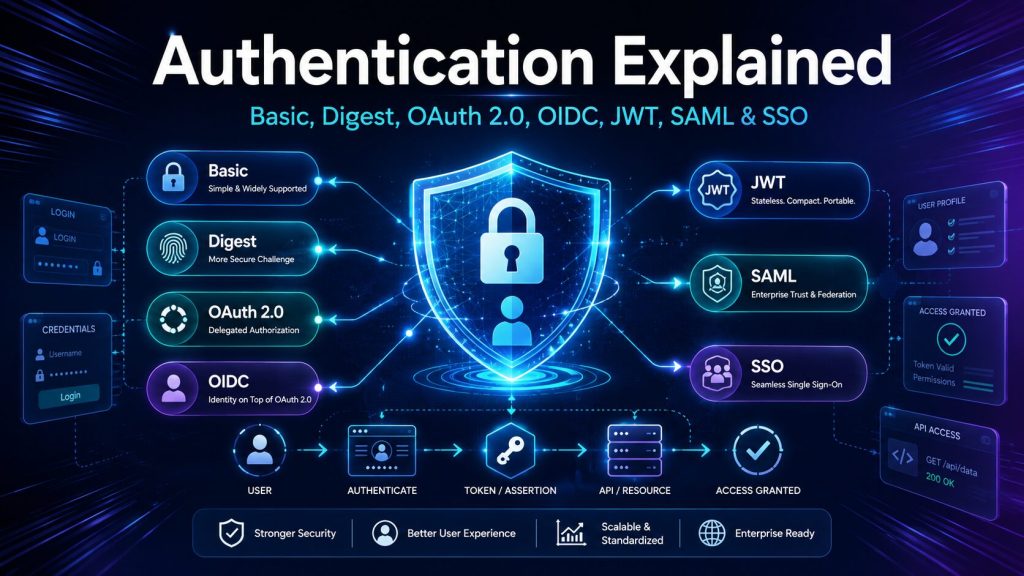
Why “Authentication” Has Become Such a Confusing Word
Authentication is one of the most important parts of software architecture, and one of the most frequently misunderstood.
Developers often use terms such as Basic Authentication, Bearer Token, JWT, OAuth 2.0, OpenID Connect, and Single Sign-On as though they were competing versions of the same technology.
They are not.
Some are authentication methods. Some are token formats. Some describe how a credential is transported. Some are authorization frameworks. Others are identity protocols or user-experience patterns.
That distinction matters because choosing the wrong mechanism can result in:
Credentials being exposed repeatedly
Tokens being accepted by the wrong application
Users being mistaken for client applications
Access tokens being incorrectly treated as proof of identity
Sessions that cannot be revoked safely
APIs that are vulnerable to token theft or replay
Authentication systems that are unnecessarily complicated
The easiest way to understand the subject is to stop putting everything into one large “authentication” bucket.
1. The Four Questions Behind Modern Identity Systems
Most identity systems answer several separate questions.
Authentication: Who are you?
Authentication verifies the identity of a user, application, device, or workload.
Examples include:
A user entering a password
A phone approving a push notification
A server presenting a client certificate
An application presenting a signed identity token
Authorization: What are you allowed to do?
Authorization happens after identity has been established.
It determines whether the authenticated identity can:
Read a document
Delete a customer record
Approve a payment
Access an administrative dashboard
Call a specific API operation
Delegation: What may this application do for you?
Delegation allows one application to obtain limited access to another system on behalf of a user.
For example:
Allow this photo-printing application to read selected pictures from my cloud storage, but do not give it my cloud-storage password.
OAuth 2.0 was designed primarily to solve this problem.
Federation: Can another trusted system establish your identity?
Federation allows an application to trust authentication performed by an external identity provider.
Examples include:
Sign in with Microsoft
Sign in with Google
An employee using a corporate identity to access Salesforce
A customer using an external identity provider to access a partner portal
OpenID Connect and SAML are commonly used for federation.
2. Authentication and Authorization Are Not the Same
Consider an employee attempting to open a payroll application.
First, the application asks:
Is this really Lino?
That is authentication.
Once the system verifies the employee’s identity, it asks:
Is Lino permitted to view payroll records for the entire company, or only his own information?
That is authorization.
HTTP status codes also reflect this difference:
401 Unauthorized generally means the request lacks valid authentication credentials.
403 Forbidden means the server understood the request and may recognize the identity, but that identity is not permitted to perform the requested action.
The name “401 Unauthorized” is historically confusing. In practical terms, think of it as unauthenticated or invalidly authenticated, while 403 represents authenticated but not permitted.
3. A Map of the Authentication Landscape
Before examining each technology, here is the most important classification.
| Concept | What it actually is | Main question answered |
|---|---|---|
| Basic Authentication | HTTP authentication scheme | Can you prove knowledge of this username and password? |
| Digest Authentication | HTTP challenge-response scheme | Can you prove knowledge of a credential without sending the raw password? |
| API key | Application or project credential | Which application, integration, or customer is calling? |
| Session authentication | Stateful authentication pattern | Which server-side login session does this browser possess? |
| Bearer token | Token-usage model | Does the caller possess the token? |
| JWT | Token format | How are claims packaged and protected? |
| Access token | Authorization credential | May this client access this resource? |
| Refresh token | Token-lifecycle credential | May this client obtain another access token? |
| OAuth 2.0 | Delegated authorization framework | What may this application access? |
| OpenID Connect | Authentication protocol built on OAuth 2.0 | Who signed in? |
| SSO | User-experience pattern | Can one login provide access to several applications? |
| SAML | XML-based federation protocol | How can identity assertions be exchanged between organizations? |
| mTLS | Certificate-based mutual authentication | Can both sides cryptographically prove their identities? |
The table is more valuable than memorizing individual acronyms. It establishes that these technologies operate at different layers and frequently work together.
4. Basic Authentication
Basic Authentication is one of the simplest HTTP authentication schemes.
The client combines a username and password:
username:password
It then Base64-encodes the result and sends it in the HTTP Authorization header:
Authorization: Basic dXNlcm5hbWU6cGFzc3dvcmQ=
The server decodes the value and validates the credentials.
A typical exchange looks like this:
The client requests a protected resource.
The server responds with
401 Unauthorizedand a Basic authentication challenge.The client resends the request with the encoded credentials.
The server validates the username and password.
The server accepts or rejects the request.
The Basic authentication specification explicitly defines the credential as a Base64-encoded user ID and password pair. Base64 is an encoding mechanism—not encryption. The original username and password can be recovered immediately by decoding the value. Basic Authentication is therefore not secure unless it is protected by TLS through HTTPS.
The main weakness
The client sends the reusable username and password with every request.
That creates several risks:
A captured credential can be replayed.
Application logs may accidentally record the header.
Proxies or monitoring tools may expose it.
Revoking access generally requires changing the password.
The password may be shared across multiple systems.
Fine-grained scopes and limited permissions are difficult to implement.
When Basic Authentication may still be acceptable
Basic Authentication can occasionally be reasonable for:
Temporary development tools
Simple internal utilities
Legacy integrations
Controlled administrative endpoints
Short-lived test environments
Even in those cases, HTTPS is mandatory, credentials should be unique to the integration, and the endpoint should be protected with rate limiting and monitoring.
For a modern public API, an API key, OAuth client credential, certificate, or other purpose-built application identity is usually preferable.
5. Digest Authentication
Digest Authentication was created to improve on Basic Authentication by avoiding transmission of the raw password.
Instead of simply encoding username:password, Digest uses a challenge-response process.
A simplified flow is:
The client requests a protected resource.
The server responds with a challenge containing values such as a realm and nonce.
The client combines the credentials, server challenge, request information, and other values.
The client calculates a cryptographic digest.
The client sends the calculated response.
The server performs its own calculation and compares the results.
A nonce is a value intended for a limited use. It helps prevent an attacker from capturing one response and replaying it forever.
Digest is more than “an MD5 password”
Digest Authentication is frequently described as merely sending an MD5 hash instead of a password. That description is incomplete.
Modern HTTP Digest is a challenge-response protocol with parameters such as:
realmnonceuriqopcnoncencresponsealgorithm
The original deployments commonly used MD5, but the current Digest specification also defines stronger algorithms, including SHA-256 and SHA-512/256 variants.
However, stronger hashing does not solve every problem. The specification warns that Digest used with human-memorable passwords remains vulnerable to dictionary attacks and recommends using it over a secure channel such as HTTPS.
Why Digest is uncommon today
Digest Authentication has largely fallen out of favor because:
It is more complicated than Basic Authentication.
Client and framework support is inconsistent.
Password-derived server records remain sensitive.
It does not provide modern delegation.
It does not naturally support federated identity.
It still benefits from—or requires—HTTPS.
Better token- and certificate-based approaches are available.
Digest may still appear in older infrastructure, embedded devices, cameras, networking products, and legacy HTTP systems. It should not normally be the first choice for a new application.
6. API Keys
An API key is usually a long, randomly generated value assigned to an application, customer, subscription, project, or integration.
It may be sent in a header such as:
X-API-Key: 8c393f7f...
Some systems use the standard authorization header:
Authorization: ApiKey 8c393f7f...
OpenAPI recognizes API keys as a distinct security scheme that may be transported through headers, cookies, or query parameters, although query-string transport should generally be avoided because URLs are frequently retained in browser history, proxy logs, analytics systems, and server logs.
What an API key usually identifies
An API key often identifies:
A software application
A calling project
A customer account
A partner integration
A billing subscription
A usage or rate-limit bucket
It does not necessarily identify the human user currently operating the application.
That is an important distinction.
Suppose a mobile application contains one API key used by every customer. The key may identify the mobile application, but it cannot reliably distinguish Alice from Bob.
OWASP therefore cautions against relying exclusively on API keys for sensitive or high-value resources and has historically recommended treating them as application or project credentials rather than user authentication credentials.
API keys are usually opaque
An opaque key carries no readable claims.
The server must look it up to determine:
Who owns it
Whether it is active
Its expiration date
Its permitted scopes
Its rate limits
Its source restrictions
Whether it has been revoked
This lookup is not necessarily a disadvantage. It makes immediate revocation straightforward.
API-key best practices
Production systems should:
Generate keys with strong randomness.
Store them in a secret manager.
Avoid hardcoding keys in public client applications.
Display a secret only once where practical.
Store a protected representation rather than unnecessary plaintext copies.
Assign narrow permissions.
Support expiration and rotation.
Maintain separate keys for separate environments.
Monitor for unusual usage.
Never place secret keys in source control.
Avoid transmitting keys in URL query strings.
Allow immediate revocation.
API keys work well for identifying callers and enforcing quotas, but stronger mechanisms are appropriate when users, sensitive permissions, or third-party delegation are involved.
7. Session-Based Authentication
Session authentication is the classic pattern used by server-rendered web applications.
The user submits a username and password once. After validating the credentials, the server creates a session record.
The server then returns a session identifier in a cookie:
Set-Cookie: session_id=7f92...;
            HttpOnly;
            Secure;
            SameSite=Lax
For subsequent requests, the browser sends the cookie automatically.
The server performs a lookup:
session_id -> user identity, roles, expiration, security state
If the session exists and remains valid, the request is treated as authenticated.
Why session IDs should be opaque
The cookie normally does not need to contain the user’s name, role, permissions, or private information.
It can be a meaningless random identifier.
The meaningful information remains on the server, which provides several benefits:
Immediate logout
Immediate account suspension
Server-controlled expiration
Centralized permission updates
Ability to terminate individual devices
Easier incident response
Where sessions are stored
Common options include:
Server memory
Fast and simple, but unsuitable for multi-server systems unless requests are pinned to one server. Sessions disappear when the process restarts.
Distributed cache
Redis and similar technologies are common because they provide fast lookup, shared access across application instances, and automatic expiration.
Database
A relational or NoSQL database offers durability and auditability but may introduce more latency.
Cookie security
A session cookie should generally use:
HttpOnlyto prevent normal JavaScript accessSecureso it is transmitted only through HTTPSAn appropriate
SameSitepolicy to reduce cross-site request risksA narrow domain and path
A controlled lifetime
Session rotation after authentication or privilege changes
OWASP warns against storing authentication tokens or session identifiers in localStorage or sessionStorage, because any JavaScript executing within the origin can read them. Secure, HttpOnly, appropriately configured cookies or a Backend-for-Frontend design are generally safer for browser applications.
The session trade-off
Sessions are stateful.
The server—or a shared session service—must remember every active login.
This adds infrastructure, but statefulness is not automatically bad. For many web applications, server-side sessions provide excellent control, straightforward revocation, and a smaller amount of security data exposed to the browser.
JWTs should not replace sessions merely because “stateless” sounds more modern.
8. Bearer Tokens
A bearer token follows a simple rule:
Whoever bears—or possesses—the token may use the authority represented by it.
A request commonly looks like this:
Authorization: Bearer eyJhbGciOiJSUzI1NiIs...
The critical characteristic is that the caller does not need to prove possession of another cryptographic key when using the token. Possession of the bearer token itself is enough.
The bearer-token specification states that any party possessing such a token may use it, which is why bearer tokens must be protected both in storage and in transit. TLS is required, and tokens should not be exposed in page URLs.
A bearer token is not necessarily a JWT
A bearer token can be:
A random opaque string
A JWT
Another structured token
A reference to a server-side authorization record
These terms describe different dimensions:
Bearer describes how authority is exercised: possession is sufficient.
JWT describes one possible token format.
An opaque bearer token may require introspection or a database lookup.
A JWT bearer token may be validated locally using cryptographic keys.
Both are still bearer tokens.
The main danger: theft and replay
Because possession is sufficient, a stolen bearer token can usually be replayed until it expires or is revoked.
Protections include:
HTTPS everywhere
Short lifetimes
Restricted audiences
Narrow scopes
Secure storage
Token rotation
Sender-constrained tokens
Mutual TLS
Demonstration of Proof of Possession, or DPoP
Monitoring and revocation
9. JSON Web Tokens: JWT
JWT stands for JSON Web Token.
A JWT is a compact, URL-safe representation of claims exchanged between parties. It is a token format—not a complete authentication protocol.
A commonly encountered signed JWT contains three Base64URL-encoded sections:
header.payload.signature
For example:
eyJhbGciOiJSUzI1NiIsInR5cCI6IkpXVCJ9
.
eyJzdWIiOiIxMjM0NSIsImF1ZCI6Im15LWFwaSJ9
.
signature-value
Header
The header contains metadata about the token, such as:
{
  "alg": "RS256",
  "typ": "JWT",
  "kid": "key-2026-01"
}
Common fields include:
alg: the cryptographic algorithmtyp: the token typekid: an identifier for the signing key
Payload
The payload contains claims:
{
  "iss": "https://identity.example.com",
  "sub": "user-12345",
  "aud": "orders-api",
  "scope": "orders.read",
  "iat": 1785141000,
  "exp": 1785141900
}
Common registered claims include:
iss: issuersub: subjectaud: intended audienceexp: expirationnbf: not valid beforeiat: issued atjti: unique token identifier
Applications may add their own claims, but token size, privacy, and stale authorization data must be considered.
Signature
The signature protects the token’s integrity.
It allows a recipient to verify that:
The token was issued by a trusted authority.
The header and payload were not modified.
The token was signed using the expected key and algorithm.
Signed does not mean encrypted
This is one of the most important JWT rules.
The header and payload of an ordinary signed JWT can be decoded by anyone possessing the token.
The signature prevents undetected modification. It does not hide the contents.
Never place secrets in a typical signed JWT, including:
Passwords
Private API keys
Financial account details
Medical information
Encryption keys
Confidential internal data
JWT standards support both signed structures and encrypted structures, but the familiar three-part token is normally a signed JWS representation. Encrypted JWE structures use a different format and require additional key management.
A JWT must be validated, not merely decoded
A secure resource server must validate at least:
The signature
The permitted algorithm
The issuer
The intended audience
The expiration
The not-before time, when present
The token type or expected usage
Any required scopes or claims
Decoding a JWT proves nothing. It merely reads untrusted input.
JWT security guidance requires applications to restrict acceptable algorithms, validate cryptographic operations, validate the issuer and audience, and prevent one kind of JWT from being substituted for another.
JWT does not automatically mean stateless
JWTs can enable local validation without a session lookup, but the surrounding system may still maintain state for:
Refresh tokens
Revocation lists
User suspension
Consent records
Key rotation
Device sessions
Risk signals
Logout tracking
The more accurate statement is:
A self-contained JWT can reduce per-request state lookups, but the complete identity system may still be stateful.
The revocation problem
A session can be deleted immediately.
A self-contained JWT may remain valid until expiration unless the resource server checks additional revocation state.
Common strategies include:
Very short access-token lifetimes
Token deny lists
Session or security-version claims
Introspection
Key rotation in severe incidents
Sender-constrained tokens
Continuous access evaluation in supporting ecosystems
JWTs are useful, but their benefits come with token-lifecycle responsibilities.
10. Access Tokens and Refresh Tokens
Modern applications often use two token types with very different responsibilities.
Access token
An access token is presented to a resource server—usually an API.
It represents permission to access a resource.
It may include or reference:
Scopes
Audience
Client identity
User context
Expiration
Authorization details
An access token should normally be short-lived because it is presented frequently.
Refresh token
A refresh token is presented only to the authorization server.
Its purpose is to obtain a new access token without asking the user to authenticate again.
A refresh token is usually longer-lived and more sensitive.
It should never be sent to ordinary resource APIs.
Typical lifecycle
The user authenticates.
The client receives an access token and possibly a refresh token.
The client calls the API with the access token.
The access token expires.
The client presents the refresh token to the authorization server.
The authorization server validates the refresh token.
A new access token is issued.
The refresh token may also be rotated.
Why not issue one token valid for six months?
A short access token limits the useful lifetime of a stolen token.
The refresh token can be more carefully protected and used less frequently.
Modern systems may use refresh-token rotation. Each successful refresh invalidates the previous refresh token and returns a replacement. Reuse of an old token can indicate theft and trigger termination of the token family.
OAuth 2.0 defines access and refresh tokens as separate credential types, while current OAuth security guidance strengthens the original model and deprecates insecure patterns.
Token storage depends on the client
There is no single correct storage mechanism for every platform.
Browser application
Prefer designs that keep sensitive tokens out of browser-accessible storage, such as:
Secure
HttpOnlycookiesA Backend-for-Frontend
Server-side token storage
Cookie-based designs must also protect against CSRF.
Native mobile application
Use the operating system’s protected credential storage, such as Keychain or Keystore.
Server application
Use a secret manager, encrypted credential store, managed identity, certificate, or other protected service credential.
Command-line tool
Use the platform’s secure credential facility where available. Device Authorization Grant may be suitable when interactive browser authentication must occur elsewhere.
11. OAuth 2.0
OAuth 2.0 is frequently called an authentication protocol.
That is inaccurate.
OAuth 2.0 is an authorization framework that allows an application to obtain limited access to an HTTP service, either on behalf of a resource owner or on its own behalf.
The sentence worth remembering is:
OAuth 2.0 answers “What may this application access?”—not necessarily “Who is the user?”
Example: connecting an application to cloud storage
Suppose a document-management application wants to read selected files from a user’s cloud drive.
Without OAuth, the application might ask the user for the cloud-drive username and password.
That would be dangerous because the application would receive:
The user’s reusable credentials
Potential access to the entire account
More permission than it needs
Credentials that remain useful outside the application
With OAuth:
The user clicks Connect Cloud Drive.
The application redirects the user to the cloud provider.
The provider authenticates the user.
The provider displays the requested permissions.
The user approves or denies the request.
The provider returns an authorization code.
The application exchanges the code for an access token.
The application uses the access token to call the cloud API.
The application never receives the cloud-drive password.
That is delegated authorization.
12. The Main OAuth 2.0 Roles
OAuth becomes easier to understand when its roles are clearly separated.
Resource owner
The person or entity that can grant access to a protected resource.
This is often the user.
Client
The application requesting access.
The word “client” refers to the software application, not necessarily the human user.
Authorization server
The system that:
Authenticates the user where appropriate
Obtains consent
Issues authorization codes
Issues access and refresh tokens
Resource server
The API that owns the protected data or operation.
The resource server accepts access tokens and enforces their scopes and authorization rules.
A single platform may host both the authorization and resource-server components, but the responsibilities remain logically different.
13. Important OAuth Flows
Authorization Code with PKCE
This is the preferred general-purpose flow for user-facing web, mobile, and browser applications.
A simplified sequence is:
The client creates a random
code_verifier.It derives a
code_challenge.The user is redirected to the authorization server.
The request includes the code challenge.
The user authenticates and grants consent.
The client receives a short-lived authorization code.
The client exchanges the code and original verifier at the token endpoint.
The server verifies that the values match.
Tokens are issued.
PKCE protects against authorization-code interception. Current OAuth security guidance recommends PKCE even for confidential clients because it also helps defend against code injection and related attacks.
Client Credentials
The Client Credentials flow is used for machine-to-machine communication when no user is involved.
Examples include:
A nightly billing job calling an invoicing API
A backend service calling another backend service
A deployment pipeline calling an infrastructure API
The client authenticates to the authorization server and receives an access token representing the application itself.
This is not user authentication.
Device Authorization Grant
The Device Authorization Grant is designed for devices with limited input capabilities or without a suitable browser, including televisions, consoles, printers, and similar devices.
The device displays a code and asks the user to complete authentication on a phone or computer. Meanwhile, the device polls the authorization server until the user approves or denies the request.
Implicit flow
The Implicit flow returned tokens through the browser-facing authorization response. It was historically used by single-page applications.
It is now considered an outdated pattern. Authorization Code with PKCE provides stronger protection and should be preferred.
Resource Owner Password Credentials
This flow allowed an application to collect the user’s username and password and exchange them for tokens.
It undermines the main OAuth principle of keeping credentials away from third-party clients. Current security guidance deprecates this mode, and new applications should not use it.
14. OAuth Does Not Automatically Authenticate the User to the Client
Imagine an application receives an OAuth access token that permits it to read a calendar.
What does that prove?
It proves that the token may be used against the specified calendar API with the granted permissions.
It does not automatically provide a standardized statement that:
The user is Lino
The user’s email is a particular address
The user authenticated recently
A particular authentication method was used
The token was intended to establish a login session in this client
Attempting to treat arbitrary OAuth access-token contents as user identity is a common design error.
Access tokens are intended for resource servers.
The client application needs an identity protocol designed for login.
That is the role of OpenID Connect.
15. OpenID Connect
OpenID Connect, commonly abbreviated OIDC, is an identity layer built on top of OAuth 2.0.
It enables a client to verify the identity of an end user based on authentication performed by an authorization server and to obtain standardized user claims.
OIDC introduces several important concepts.
The openid scope
An OAuth authorization request becomes an OpenID Connect authentication request when it includes the openid scope.
For example:
scope=openid profile email
Without openid, the request may be valid OAuth, but it is not an OIDC authentication request.
ID token
OIDC introduces the ID token.
An ID token is a JWT containing claims about the user’s authentication event.
A simplified ID token might contain:
{
  "iss": "https://identity.example.com",
  "sub": "248289761001",
  "aud": "client-application-id",
  "nonce": "n-0S6_WzA2Mj",
  "iat": 1785141000,
  "exp": 1785141600
}
Important claims include:
iss: who issued the tokensub: stable identifier for the user at that issueraud: the client for which the token was issuedexp: when it expiresiat: when it was issuednonce: binds the response to the initiating browser flowauth_time: when authentication occurred, when suppliedacroramr: information about authentication context or methods, when supplied
Access token versus ID token
| Token | Intended consumer | Purpose |
|---|---|---|
| ID token | Client application | Establish information about the authentication event |
| Access token | Resource server or API | Authorize access to protected resources |
| Refresh token | Authorization server | Request replacement access tokens |
An ID token should not be sent to an API as a substitute for an access token.
Likewise, a client should not assume that an access token is an ID token.
Typical OIDC login flow
The user selects Sign in with Microsoft.
The client redirects the browser to the OpenID Provider.
The user authenticates.
The provider obtains any required consent.
The provider returns an authorization code.
The client exchanges the code at the token endpoint.
The response contains an ID token and usually an access token.
The client validates the ID token.
The client creates its own application session.
The access token is used only when calling the intended API.
ID-token validation
The client must validate more than the signature.
It should verify:
Trusted issuer
Expected audience
Signature and approved algorithm
Expiration
Nonce, where applicable
Authorized party, where applicable
Any flow-specific hashes or security values
OIDC standardizes federated login. It does not remove the need for careful validation.
16. Single Sign-On
Single Sign-On, or SSO, means that a user authenticates once and can access multiple applications without repeatedly entering credentials.
SSO is not one specific protocol.
It is a user-experience and identity-architecture pattern implemented using technologies such as:
OpenID Connect
SAML
Kerberos
Integrated Windows Authentication
Centralized identity-provider sessions
How browser-based SSO works
Suppose a company uses one identity provider for payroll, customer relationship management, and an internal learning portal.
The user opens the payroll application.
Payroll redirects the browser to the corporate identity provider.
The user signs in.
The identity provider creates a login session.
Payroll receives a trusted identity response.
Later, the user opens the learning portal.
The portal redirects to the same identity provider.
The identity provider recognizes its existing session.
The user is redirected back without entering credentials again.
Each application may create its own local session after receiving the identity response.
The SSO experience comes from the identity provider’s central session and the trust relationships between the provider and applications.
SSO does not necessarily mean Single Sign-Out
Ending one application session does not automatically end:
The local sessions of every other application
The central identity-provider session
Mobile tokens
Refresh tokens
Sessions on other devices
Single logout is a separate and more complex design problem.
17. SAML
SAML stands for Security Assertion Markup Language.
SAML is an XML-based framework for exchanging security information between trusted parties. That information is represented in portable SAML assertions.
SAML remains common in enterprise federation.
Main SAML roles
Identity Provider
The Identity Provider, or IdP, authenticates the user and creates the identity assertion.
Service Provider
The Service Provider, or SP, is the application the user wants to access.
Examples include:
Salesforce
Workday
ServiceNow
An enterprise learning system
A corporate partner portal
Simplified SP-initiated flow
The user visits the Service Provider.
The Service Provider determines that the user is not authenticated.
The browser is redirected to the Identity Provider with a SAML authentication request.
The Identity Provider authenticates the user.
It creates and signs a SAML assertion.
The browser posts the SAML response to the Service Provider.
The Service Provider validates the assertion.
The Service Provider creates a local session.
The assertion may contain:
Subject identifier
Authentication statement
Attributes
Audience restrictions
Time restrictions
Issuer
Signature
SAML compared with OIDC
| SAML | OpenID Connect |
|---|---|
| XML-based | JSON- and JWT-based |
| Strong enterprise and legacy adoption | Strong modern web, mobile, and API adoption |
| Often uses browser POST and redirects | Uses OAuth-style endpoints and redirects |
| Identity information carried in assertions | Identity information carried primarily in ID tokens |
| Common in older enterprise SaaS integrations | Common in modern applications and cloud identity |
OIDC is frequently preferred for new web and mobile applications, while SAML remains necessary for many enterprise integrations.
Neither protocol is secure merely because it is a standard. Implementations must validate signatures, issuers, audiences, destinations, timestamps, response correlation, and replay protections.
18. Mutual TLS and Certificate Authentication
Mutual TLS, or mTLS, authenticates both sides of a TLS connection.
Ordinary HTTPS typically works like this:
The server presents a certificate.
The client verifies the server.
The client is not necessarily identified by a certificate.
With mTLS:
The server presents a certificate.
The client also presents a certificate.
Each side validates the other.
mTLS is particularly useful for:
Service-to-service authentication
High-security partner integrations
Zero-trust workload identity
Financial and regulated APIs
Sender-constrained OAuth tokens
The advantage is that possession of the private key can be proven cryptographically. A copied token alone may not be sufficient if the token is bound to the client certificate.
The disadvantage is operational complexity:
Certificate issuance
Rotation
Expiration
Revocation
Trust-store management
Private-key protection
Troubleshooting
Current OAuth security guidance recommends asymmetric client-authentication mechanisms such as mTLS or signed private-key JWT authentication when appropriate.
19. How the Technologies Fit Together
A production application may use several of these technologies simultaneously.
Consider a modern business application:
The user selects Sign in with Microsoft.
The application starts an OIDC Authorization Code flow with PKCE.
OAuth provides the authorization framework.
OIDC adds authentication and returns an ID token.
The ID token is formatted as a JWT.
The application validates the ID token.
The application creates a server-side session.
The browser receives a secure session cookie.
The application uses an OAuth access token to call an API.
That access token may also be formatted as a JWT.
The API receives it through the Bearer authorization scheme.
The API validates the token and applies authorization policies.
In that single system:
OIDC is the authentication protocol.
OAuth 2.0 is the authorization framework.
JWT is the token format.
Bearer is the token-presentation model.
The access token protects the API.
The ID token describes the authentication event.
The cookie carries the application’s session identifier.
SSO may prevent repeated login across several applications.
These terms are complementary, not interchangeable.
20. Common Authentication Mistakes
Mistake 1: Calling JWT an authentication method
JWT is a format.
It becomes part of an authentication or authorization system only when a protocol defines how it is issued, validated, and used.
Mistake 2: Calling OAuth a login protocol
OAuth provides delegated authorization.
OIDC adds standardized authentication.
Mistake 3: Sending an ID token to an API
The ID token is intended for the client application.
The API should receive an access token issued for that API.
Mistake 4: Accepting a token without checking its audience
A validly signed token issued for another application should not be accepted.
Signature validation alone is insufficient.
Mistake 5: Trusting the algorithm specified by an attacker-controlled token
The application must configure acceptable algorithms rather than blindly trusting the token’s alg field.
Mistake 6: Assuming JWT contents are private
A signed JWT payload is normally readable.
Do not store secrets in it.
Mistake 7: Storing long-lived tokens in browser local storage
A successful XSS attack can read browser-accessible storage.
Prefer a secure cookie or Backend-for-Frontend design for sensitive browser tokens.
Mistake 8: Using API keys to authenticate end users
API keys commonly identify applications or projects.
Use a real user-authentication mechanism when individual identity matters.
Mistake 9: Using one access token for every API
Tokens should have clear audience restrictions.
An access token for the billing API should not automatically work against the employee API.
Mistake 10: Creating very long-lived bearer tokens
A stolen bearer token is usable by its possessor.
Keep access-token lifetimes short and protect refresh tokens carefully.
Mistake 11: Implementing an identity provider from scratch
OAuth, OIDC, SAML, key rotation, session management, recovery, MFA, consent, revocation, and abuse prevention are difficult to implement correctly.
Use mature identity platforms and standards-compliant libraries whenever possible.
21. Choosing the Right Approach
Traditional server-rendered web application
Use:
OIDC for external or enterprise login
A secure server-side session
An
HttpOnly,Secure, appropriately configured cookie
This provides strong central authentication while retaining simple session control.
Single-page application
Use:
Authorization Code with PKCE
OIDC for user login
A Backend-for-Frontend where practical
Short-lived access tokens for APIs
Avoid the Implicit flow and avoid exposing long-lived credentials to browser JavaScript.
Native mobile application
Use:
OIDC Authorization Code with PKCE
System browser or approved authentication session
Protected OS credential storage
Short-lived access tokens
Refresh-token rotation where supported
Do not embed a confidential client secret in the mobile package. A secret distributed to every installation is not truly secret.
Machine-to-machine service
Use:
OAuth Client Credentials
Managed workload identity
mTLS
Signed client assertion
Private-key JWT
Avoid representing a service as a fake human user.
Public developer API
Use OAuth when:
User delegation is required
Granular scopes are required
Third parties need controlled access
Revocable consent is required
API keys may supplement OAuth for:
Project identification
Usage metering
Rate limiting
Low-risk public data access
Enterprise SSO
Prefer OIDC for modern applications.
Support SAML when:
Customers require it
Existing identity infrastructure depends on it
An enterprise SaaS ecosystem already uses it
Smart TV or input-limited device
Use the OAuth Device Authorization Grant.
Temporary internal integration
Basic Authentication over HTTPS may work technically, but a unique API key, client credential, certificate, or managed identity is usually easier to control and revoke safely.
22. Production Security Checklist
Before releasing an authentication system, verify the following.
Transport
HTTPS is required everywhere.
Tokens and credentials never appear in URLs.
Redirect URIs use exact matching.
Sensitive responses are not cached improperly.
Passwords
Passwords are stored using an appropriate password-hashing algorithm.
Login endpoints have rate limiting and abuse detection.
Password-reset tokens are short-lived and single-use.
Account enumeration is minimized.
Multifactor authentication is supported where risk warrants it.
Sessions
Session identifiers are random and unpredictable.
Cookies use
HttpOnlyandSecure.SameSiteis configured intentionally.Sessions are rotated after login and privilege elevation.
Logout invalidates the server-side session.
Idle and absolute expiration are enforced.
OAuth and OIDC
Authorization Code with PKCE is used for user-facing flows.
Implicit and password grants are avoided.
stateis validated.OIDC
nonceis validated where required.Issuer, audience, signature, expiration, and token type are checked.
Redirect URIs are pre-registered.
Access tokens are sent only to their intended resource servers.
ID tokens are not used as access tokens.
Refresh-token rotation or equivalent protections are implemented.
Scopes follow least privilege.
JWT
Permitted algorithms are configured explicitly.
noneis rejected unless a highly specialized profile explicitly requires it.Weak symmetric keys are avoided.
Issuer and audience are validated.
Token types cannot be substituted.
Key rotation is supported.
Sensitive information is excluded from readable payloads.
Access-token lifetimes are short.
Revocation requirements are understood.
API keys and service credentials
Secrets are not embedded in source code.
Public clients do not contain privileged reusable secrets.
Keys are scoped and rotated.
Keys can be revoked immediately.
Usage is logged and monitored.
Separate environments use separate credentials.
Managed identities or certificates are preferred where available.
23. The Final Mental Model
Authentication becomes far easier once the technologies are placed into the correct categories.
Credential-based HTTP schemes
Basic
Digest
Application credentials
API keys
Client secrets
Certificates
Managed workload identities
Stateful authentication
Server-side sessions
Secure cookies
Token presentation
Bearer tokens
Sender-constrained tokens
Token formats
JWT
Opaque tokens
SAML assertions
Token lifecycle
Access tokens
Refresh tokens
Rotation
Revocation
Expiration
Authorization and delegation
OAuth 2.0
Scopes
Consent
Client Credentials
Authorization Code with PKCE
Device Authorization Grant
Federated authentication
OpenID Connect
SAML
User experience
Single Sign-On
Single Logout
Passwordless authentication
Multifactor authentication
Once these layers are separated, the acronyms stop competing with one another.
A system does not normally choose JWT instead of OAuth, because OAuth may issue a JWT.
It does not necessarily choose OIDC instead of sessions, because an OIDC login commonly results in a local application session.
It does not choose Bearer instead of access token, because an access token may be presented as a bearer token.
It does not choose SSO instead of OIDC, because OIDC may be the protocol that enables SSO.
Conclusion
The evolution of authentication is not simply a timeline in which every new technology replaces the previous one.
Each approach solves a different problem.
Basic and Digest Authentication address direct HTTP credential verification.
API keys identify applications and integrations.
Sessions allow servers to maintain strong control over browser logins.
Bearer tokens provide a standard way to present authority.
JWT provides a portable format for signed or encrypted claims.
Access and refresh tokens separate frequent API access from long-term session continuity.
OAuth 2.0 enables delegated authorization.
OpenID Connect adds federated authentication.
SAML provides enterprise identity assertions.
SSO creates a seamless experience across multiple applications.
The most secure architecture is not the one using the greatest number of acronyms. It is the one that clearly identifies:
Who or what must authenticate
Which resource must be protected
Who issues the credential
Who is allowed to consume it
What permissions it represents
How long it remains valid
How it is stored
How it is renewed
How it is revoked
What happens when it is stolen
Once those questions are answered, selecting the right authentication and authorization technologies becomes a disciplined architectural decision rather than a collection of confusing buzzwords. The Training Boss stands ready to engage with your company to help set the security layer for your application with Enterprise Grade Security based on experience and proven architectures and implementation. Reach out to us today.