Microsoft Fabric and Azure Databricks are both powerful platforms for modern data engineering, analytics, AI, and business intelligence. But as organizations bring these platforms together, one architectural question comes up often:
Should I use Fabric Shortcuts or Fabric Mirroring when working with Azure Databricks?
The answer is not that one is always better than the other. The real answer is:
Use Mirroring when Azure Databricks Unity Catalog is your governed source of truth and you want Fabric users to easily consume those Databricks tables.
Use Shortcuts when your data already exists in lake storage and you want Fabric to reference it without copying it.
Let’s break this down in a practical way:
The Big Picture
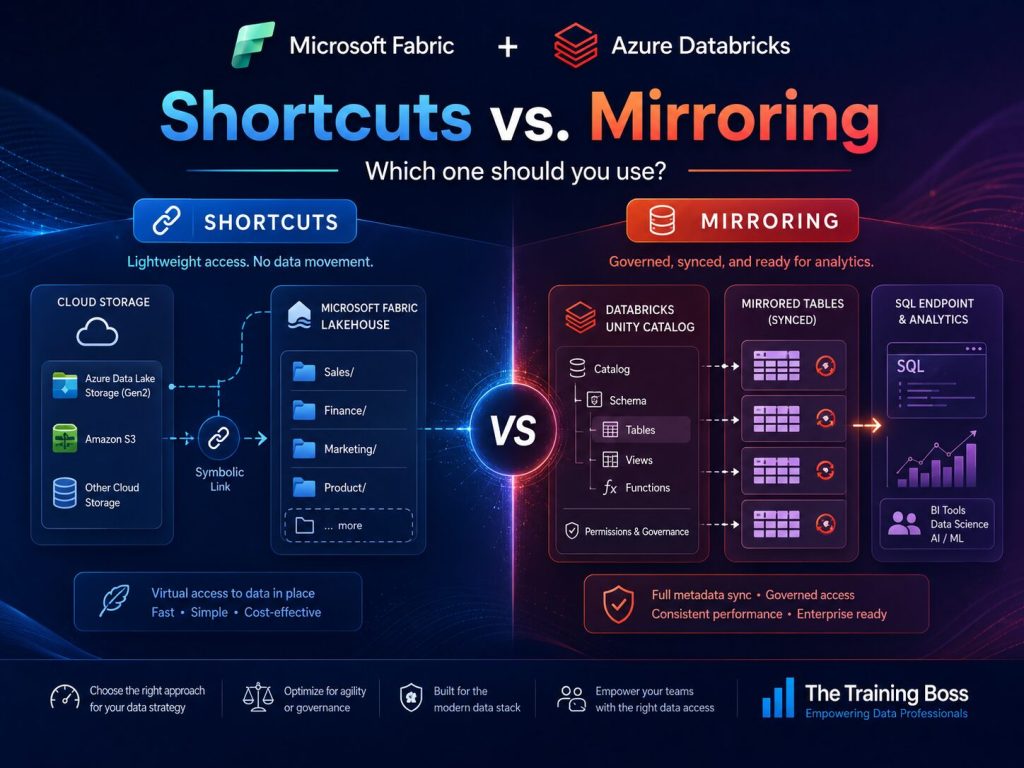
Fabric Shortcuts and Fabric Mirroring can both help you avoid unnecessary data movement, but they solve different problems.
Shortcuts are best when Fabric needs to point to data that already exists in storage.
Mirroring is best when Fabric needs to expose and consume governed tables from another system, such as Azure Databricks Unity Catalog.
A simple way to think about it is this:
Storage-first integration  → Use Shortcuts
Catalog-first integration → Use MirroringWhat Are Microsoft Fabric Shortcuts?
Fabric Shortcuts are like symbolic links inside OneLake.
They allow a Fabric Lakehouse to point to data that already exists somewhere else, such as:
- OneLake
- Azure Data Lake Storage Gen2
- Azure Blob Storage
- Amazon S3
- S3-compatible storage
- Google Cloud Storage
- Iceberg
- Dataverse
- SharePoint or OneDrive
Instead of copying the data into Fabric, you create a shortcut that references the source location.
This means your Fabric users can work with the data as if it is part of the Fabric Lakehouse, while the data physically remains where it already lives.
When Should You Use Shortcuts?
Shortcuts are ideal when your source is lake storage.
For example, imagine Azure Databricks writes curated Delta tables into ADLS Gen2:
Azure Databricks
      ↓ writes Delta files
ADLS Gen2
      ↑ referenced by shortcut
Fabric Lakehouse
      ↓
Power BI / Spark / Data EngineeringShortcuts are a great fit when you want lightweight, zero-copy access to data that already exists.
Great Use Cases for Shortcuts
1. Databricks Writes Delta Files to ADLS Gen2
If Databricks is writing Delta or Parquet files to ADLS Gen2, and Fabric simply needs to consume those files, Shortcuts are usually the cleanest option.
You are not trying to mirror a governed catalog. You are just giving Fabric access to existing lake data.
2. You Want Zero-Copy Lake Access
Shortcuts help avoid unnecessary copies of the same data.
This reduces storage duplication, lowers latency, and simplifies your data architecture.
Instead of building pipelines just to move files from one lake location to another, you allow Fabric to reference the data where it already exists.
3. You Need to Unify Data Across Multiple Storage Locations
Many organizations have data spread across different clouds and storage systems.
You might have:
- Sales data in ADLS Gen2
- Marketing data in Amazon S3
- Finance data in OneLake
- Operational data in Dataverse4. You Want a Lightweight Integration
Shortcuts are useful when the question is simple:
“Can Fabric see this data without copying it?”
If the answer is yes, a Shortcut is probably the right tool.
What Is Microsoft Fabric Mirroring?
Fabric Mirroring is a more managed experience.
In general, Mirroring is designed to bring data from other systems into OneLake for analytics with low latency and minimal complexity.
But with Azure Databricks, there is an important detail:
Fabric Mirroring for Azure Databricks Unity Catalog is primarily metadata mirroring.
That means Fabric mirrors the Databricks catalog, schema, and table structure into Fabric. The data itself is not physically copied in the traditional sense. Instead, Fabric can access the underlying table data through the mirrored catalog experience.
This is very powerful when Azure Databricks Unity Catalog is the system where your tables are governed, organized, and discovered.
When Should You Use Mirroring?
Use Mirroring when your source is Azure Databricks Unity Catalog, not just files sitting in storage.
For example:
Azure Databricks Unity Catalog
      ↓ metadata sync
Fabric Mirrored Azure Databricks Catalog
      ↓
SQL Analytics Endpoint
      ↓
Power BI Direct Lake / T-SQL / Fabric workloadsGreat Use Cases for Mirroring
1. Databricks Unity Catalog Is Your Source of Truth
If your enterprise uses Unity Catalog to govern Databricks tables, Mirroring is usually the better option.
Unity Catalog gives you a structured organization of:
Catalogs
  Schemas
Tables2. Business Users Need Access Through Fabric and Power BI
This is one of the strongest reasons to use Mirroring.
Your data engineers may prefer Databricks, but your analysts and business users may live in Fabric and Power BI.
Mirroring creates a much cleaner bridge between those worlds.
Instead of asking business users to understand storage paths, Delta table locations, or Databricks workspace details, you expose Databricks tables through Fabric.
3. You Want a SQL Analytics Endpoint
When Databricks Unity Catalog is mirrored into Fabric, users can access the data through a SQL analytics endpoint.
That is very helpful for teams that want to query Databricks-governed data using T-SQL-style experiences in Fabric.
4. You Want Power BI Direct Lake Scenarios
Mirroring also supports modern Power BI consumption patterns, including Direct Lake scenarios.
This is especially useful when your goal is to combine Databricks engineering with Fabric and Power BI reporting.
5. You Want Automatic Metadata Sync
If schemas and tables are added or removed in Databricks, Mirroring can help keep Fabric aligned with those changes.
This is much better than manually creating and maintaining individual shortcuts for every table or folder.
Important Security Considerations
This part is extremely important:
Unity Catalog permissions do not automatically become Fabric permissions.
Even if a table is governed in Azure Databricks Unity Catalog, you still need to configure access correctly in Fabric.
Do not assume this:
Databricks Unity Catalog security = Fabric securityA better way to think about it is:
Databricks governs access in Databricks.
Fabric governs access in Fabric.