
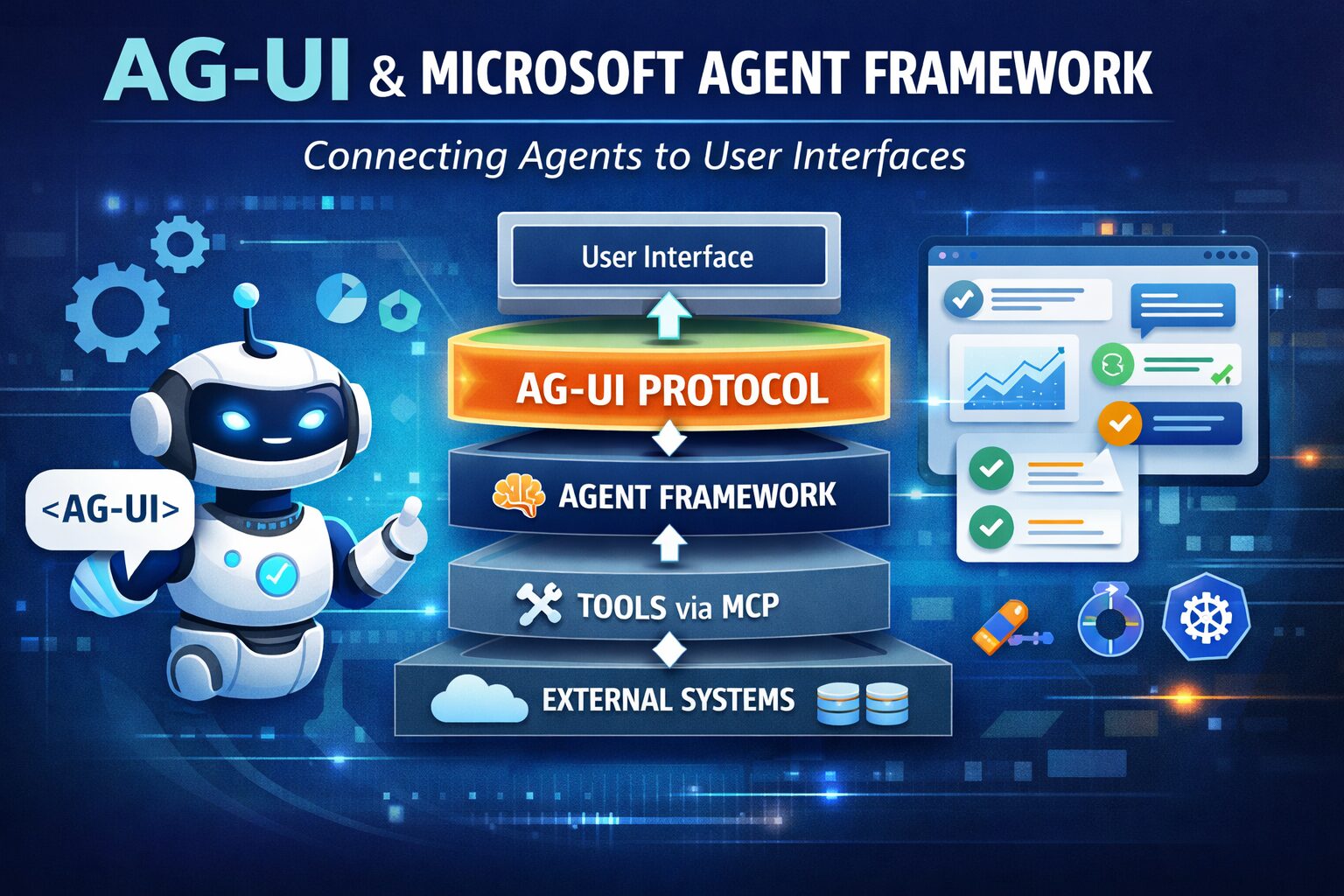
The AGUI protocol is becoming one of the most important emerging standards in the agentic-AI stack, especially if you’re working with the Microsoft Agent Framework.
Think of it as the missing contract between agents and user interfaces.
What AGUI Actually Is
AGUI (Agent-User Interaction Protocol) is an open, event-based protocol that standardizes how AI agents communicate with frontend applications (web apps, chat apps, dashboards, copilots, etc.).
Instead of inventing custom JSON schemas, WebSocket pipelines, or UI adapters per agent:
“AGUI defines a shared event stream for messages, tool calls, state updates, and UI synchronization between agent backends and user interfaces.”
A helpful mental model:
| Protocol | Connects |
|---|---|
| REST | browser ↔ server |
| MCP | agent ↔ tools |
| A2A | agent ↔ agent |
| AGUI | agent ↔ user interface |
Who Created AGUI
AGUI was created by the CopilotKit team as an open protocol for agent-to-UI communication.
Microsoft did not invent AGUI.
Instead:
Microsoft adopted it and integrated it into the Microsoft Agent Framework because it solves a real ecosystem fragmentation problem.
This mirrors what happened with:
- OpenAPI
- OAuth
- Kubernetes
Microsoft is aligning with emerging standards instead of reinventing them.
That’s strategically important.
Why AGUI Exists (The Real Problem It Solves)
Before AGUI:
Every agent system needed its own:
- streaming transport
- tool invocation messages
- UI event schema
- progress signals
- interrupt handling
- state sync model
Result:
Frontend engineers had to rebuild the same plumbing repeatedly.
AGUI fixes this by providing:
1. Streaming as a First-Class Primitive
Agents can stream:
- tokens
- tool calls
- intermediate reasoning states
- UI updates
instead of returning only final responses.
2. Shared State Between Agent and UI
AGUI allows:
agent → UI state update
UI → agent action
bidirectionally.
This enables:
- editable agent workflows
- human-in-the-loop corrections
- live dashboards
- structured agent forms
- Copilot-style interfaces
3. Tool Invocation Transparency
Example:
Instead of this invisible pipeline:
agent → calls tool silentlyYou get:
agent → emits tool_call event
UI renders progresstool executes
UI shows resultagent continues
This is essential for enterprise trust.
4. Interruptible Agent Workflows
AGUI supports:
pause
resume
cancel
redirect
override
These are mandatory capabilities for production agents.
Why Microsoft Agent Framework Supports AGUI
The Agent Framework provides:
| Capability | Provided By |
|---|---|
| reasoning | Agent Framework |
| orchestration | Agent Framework |
| memory | Agent Framework |
| tool calling | Agent Framework |
| multi-agent workflows | Agent Framework |
| UI communication | AGUI |
Microsoft describes the split clearly:
“Agent Framework handles intelligence and workflows, while AGUI standardizes communication with user interfaces.”
So:
Agent Framework = brain
AGUI = voice + body language
How AGUI Fits Into the Modern Agent Protocol Stack
In serious enterprise agent architecture today:
User Interface
      ↑
   AGUI
      ↑
Agent Runtime (Agent Framework)
      ↑
Tools via MCP
      ↑
External systems
And optionally:
Agent ↔ Agent via A2AThis layered architecture is exactly what Microsoft is converging toward.
How Important AGUI Is for Microsoft Agent Framework (Practically)
Short answer:
Not mandatory, but strategically critical.
Long answer:
Without AGUI
You can still:
- build agents
- orchestrate tools
- run workflows
- use memory
- deploy multi-agent systems
But:
You must build custom UI plumbing.
With AGUI
You get:
- streaming responses
- shared UI state
- interruptible workflows
- real-time tool progress
- structured UI events
- reusable frontend clients
- multi-agent visualization support
Essentially:
Agents become products, not just APIs.
Why This Matters Especially in Foundry + Enterprise Scenarios
AGUI unlocks:
Copilot-Style UX
Instead of:
chat in → answer outYou get:
chat
forms
actions
progress indicators
agent planning views
tool visualizations
multi-agent routing
Exactly what Microsoft 365 Copilot experiences look like internally.
The “Golden Triangle” Microsoft Is Building Around Agents
Microsoft positioning today (implicitly):
| Layer | Purpose |
|---|---|
| Agent Framework | reasoning runtime |
| AGUI | interaction protocol |
| OpenTelemetry | observability |
This combo represents a strong signal of long-term direction.
Executive-Level Summary
AGUI is to agent interfaces what REST was to web APIs:
a shared contract that lets any agent talk to any UI without custom wiring
For Microsoft Agent Framework:
- not required
- but increasingly foundational
- and likely to become the default UI transport layer for enterprise agents
Reach out to the team at the Training Boss if you need to learn more and partner with us for architecture, implementation or training on all Data and AI Topics.

Leave a Reply
You must be logged in to post a comment.