Your AI prototype works beautifully with ten examples. Then someone asks it to process ten million.
Suddenly, how you package your data becomes a very interesting conversation.
Enter JSON and JSONL: two closely related formats that help move information through AI applications. They look similar, carry the same kinds of values, and often work together in the same solution. But they organize records differently, and that difference matters when you start building training datasets, evaluating models, or processing a steady flow of business events.
Let’s make the distinction practical.
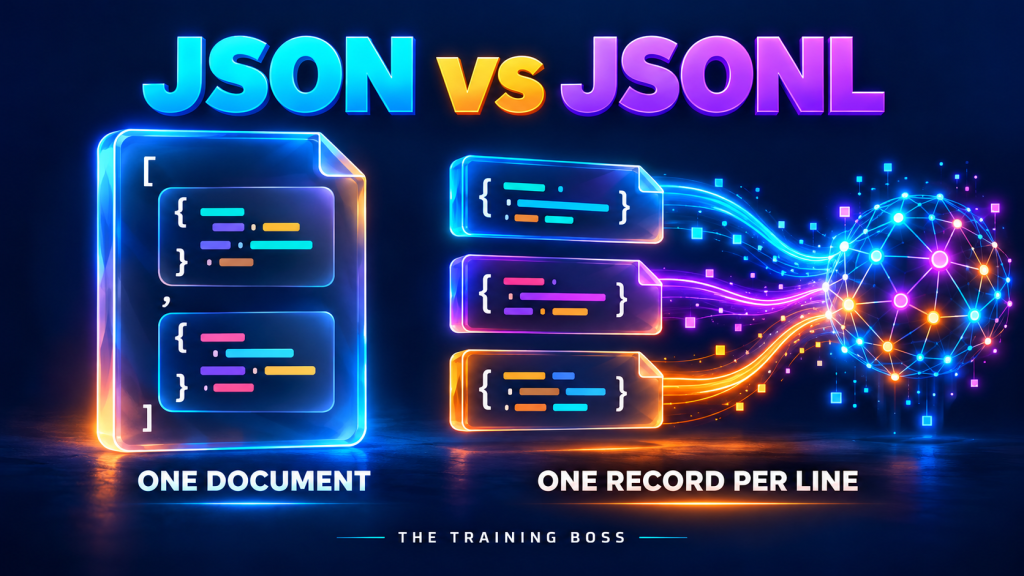
JSON organizes data as one complete document. JSONL organizes data as a sequence of independently readable JSON values, one per line.
Think of a JSON document as a complete order folder. Think of JSONL as a conveyor belt carrying individual order folders. Both can contain rich, nested information. The difference is how you package and process them.
Start with JSON: One Complete Document
JSON stands for JavaScript Object Notation, although its use extends far beyond JavaScript. It represents structured information using objects, arrays, strings, numbers, booleans, and null. A JSON document contains one top-level value, often an object or an array. See the JSON specification.
Imagine you are building an AI assistant that classifies customer support requests. Here are two labeled examples stored in a JSON array:
[
  {
    "id": "ticket-101",
    "text": "I was charged twice for my subscription.",
    "category": "billing"
  },
  {
    "id": "ticket-102",
    "text": "How do I reset my password?",
    "category": "account_access"
  }
]
The outer square brackets make this one JSON document containing two records. Commas separate the records.
That structure is useful when the collection belongs together: perhaps it is a small export, the result of an API request, or a set of examples you want to inspect.
JSON is also a natural fit for an individual AI result:
{
  "ticket_id": "ticket-101",
  "category": "billing",
  "suggested_queue": "payments_support",
  "needs_human_review": true
}
Your application can read those fields and use them to route the ticket. Before taking action, it should validate that the fields and values meet its requirements.
Use JSON when your application needs one coherent payload: a request, a response, a configuration, or a complete structured result.
Meet JSONL: One Record per Line
JSONL stands for JSON Lines. Here are the exact same support examples in JSONL:
{"id":"ticket-101","text":"I was charged twice for my subscription.","category":"billing"}
{"id":"ticket-102","text":"How do I reset my password?","category":"account_access"}
Notice what changed:
-
There are no outer square brackets around the collection.
-
There are no commas between records.
-
Each physical line contains one complete JSON value.
Objects are the usual choice for AI datasets, although JSONL permits other JSON values too. Files use UTF-8, blank lines are invalid, and a final newline is recommended. These rules come from the JSON Lines format documentation.
A record can still contain nested objects and arrays. It simply needs to stay on one physical line.
The “L” changes how records are separated. It does not remove JSON’s ability to represent complex data.
And here is a trap worth catching early: changing a filename from examples.json to examples.jsonl does not convert its contents!
Why AI Engineers Care About That Extra Letter
AI workflows often process collections of independent examples:
-
Training examples used to adjust a model’s behavior.
-
Evaluation cases used to measure model quality.
-
Document chunks prepared for retrieval.
-
Requests submitted for batch processing.
-
Events recorded while an AI application runs.
That makes a format with clear record boundaries useful.
With a suitable reader, JSONL lets a pipeline process one record, release it, and move to the next. Hugging Face’s dataset tooling supports this approach, including streaming local JSONL data. See its dataset loading and streaming documentation.
For a large support dataset, your pipeline could:
-
Read one ticket.
-
Check its required fields.
-
Remove information that should not enter the downstream dataset.
-
Transform the text.
-
Write the prepared record.
-
Continue with the next ticket.
The benefit comes from incremental processing. If your code reads the entire JSONL file into a list first, you lose much of that memory advantage.
JSON arrays can also be processed incrementally with specialized parsers. JSONL simply makes record-by-record processing straightforward with ordinary line-reading tools.
Example: Building an AI Evaluation Dataset
Suppose your team wants to compare two versions of a support assistant. You need a repeatable set of questions and expected classifications.
An illustrative evaluation file might look like this:
{"case_id":"eval-001","input":"Please cancel my plan.","expected_category":"cancellation"}
{"case_id":"eval-002","input":"My invoice includes an extra charge.","expected_category":"billing"}
{"case_id":"eval-003","input":"I cannot sign in.","expected_category":"account_access"}
Your evaluation program sends each input to the assistant, compares the prediction with the expected category, and records the outcome.
Now you can answer a useful business question: Did the new version improve ticket routing, or did it just sound more polished?
These field names are an example schema for your own evaluation program. A managed platform may require different fields.
That distinction matters for fine-tuning too. Some services explicitly require JSONL datasets; for example, Google Cloud’s documented tuning command requires a JSONL training file. But the contents must also match the model’s expected schema. See the tuning dataset requirements.
A file can be valid JSONL and still be invalid input for your AI platform. Check both its syntax and its required structure.
Example: Preparing Documents for RAG
Retrieval-augmented generation, or RAG, gives an AI application relevant reference material when it answers a question.
Imagine preparing product documentation as individual chunks:
{"chunk_id":"guide-001","source":"setup-guide","text":"Connect the device to power before starting setup.","metadata":{"section":"installation"}}
{"chunk_id":"guide-002","source":"setup-guide","text":"Hold the reset button for five seconds.","metadata":{"section":"troubleshooting"}}
This is an illustrative intermediate format for your pipeline. Each record carries text, an identifier, and context about its source.
Your application could read a chunk, generate its embedding, and send the result to a search index. The identifier helps track updates; the source metadata can help connect an answer to its supporting document.
JSONL is the packaging for those records. You still need the rest of the retrieval architecture: chunking decisions, embedding generation, indexing, access controls, and evaluation.
That is where a small format choice connects to a much bigger engineering outcome.
JSON and JSONL Often Belong in the Same Solution
Picture a support automation system:
A customer submits a request. Your application exchanges a JSON payload with an AI service. The service returns a structured classification. Your system records a processing event in a JSONL log.
Later, your team selects reviewed examples, prepares a JSONL evaluation dataset, and measures whether the next version performs better.
One workflow. Two formats. Different jobs.
| Your task | Good starting choice | Why |
|---|---|---|
| Send an individual API request | JSON | Represents one complete payload |
| Store an assistant’s configuration | JSON | Keeps related settings together |
| Return one structured AI result | JSON | Gives the application a defined object to validate |
| Maintain independent evaluation cases | JSONL | Makes each case separately readable |
| Prepare fine-tuning data | Platform-required format, often JSONL | The service determines the format and schema |
| Export document chunks for ingestion | JSONL, if supported | Fits record-by-record processing |
| Record an ongoing sequence of events | JSONL | Fits sequential records and controlled appends |
Always let the receiving tool’s contract take priority over your preferred extension.
A Tiny Python Example Makes It Click
For a small JSON array, Python’s standard JSON library can load the document:
import json

with open("tickets.json", encoding="utf-8") as file:
    tickets = json.load(file)

for ticket in tickets:
    print(ticket["category"])
For JSONL, parse each line separately:
import json

with open("tickets.jsonl", encoding="utf-8") as file:
    for line in file:
        ticket = json.loads(line)
        print(ticket["category"])
The first example loads the complete document. The second processes one record at a time without collecting every record in memory. Python documents these parsing functions in its JSON library reference.
Production code should also validate fields and report malformed records. A broken line is easier to identify when records have separate boundaries, but your application must decide whether to stop, retry, or quarantine it.
Three Mistakes to Avoid
1. Pretty-printing each JSONL record across multiple lines.
Whitespace can make a JSON document easier to read, but JSONL relies on physical lines to separate records. Inside a string, represent a line break with the escaped sequence \n.
2. Assuming JSONL automatically makes AI cheaper or smarter.
It can simplify data handling. Model quality still depends on the examples, labels, context, and evaluation. Token use depends on what you actually send to the model.
3. Treating valid syntax as proof of good data.
A perfectly formatted record can still contain an incorrect label, duplicate example, missing source, or outdated answer. Build quality checks into the pipeline.
The format gets your data through the door. The quality of that data determines what your AI can do with it.
Turn Better Data Decisions into Business Opportunities
Choosing between JSON and JSONL is a small decision with practical consequences: how your systems exchange information, how your pipelines process records, and how confidently you can evaluate changes.
Those decisions add up.
At The Training Boss, we help organizations connect data and AI architecture to implementation, from data pipelines and platform modernization to AI assistants, RAG solutions, and hands-on team training.
Whether you are improving customer service, accelerating access to business knowledge, or developing a new AI-powered offering, we can help you design the architecture and build the systems that move the opportunity forward.
Ready to energize your business opportunities with Data and AI? Connect with The Training Boss and let’s turn your next idea into a working solution.