Microsoft recently announced Toolboxes in Microsoft Foundry, and while the name sounds simple, the idea is very important for companies building real AI agents.
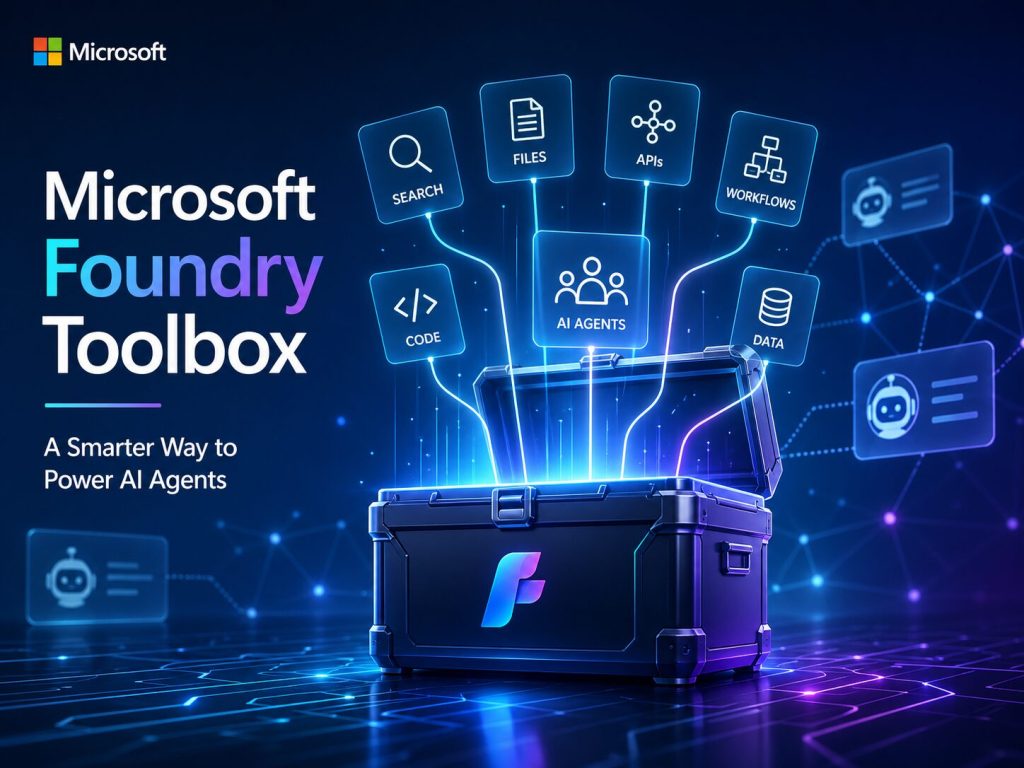
In plain English, Foundry Toolbox gives organizations a central place to package, manage, reuse, and govern the tools that AI agents need to do useful work.
That matters because today’s AI agents are not just supposed to chat. They are expected to search data, call APIs, use enterprise systems, analyze files, create tickets, update records, trigger workflows, and sometimes collaborate with other agents.
That is where things can get complicated fast.
If every agent team connects to tools in its own way, you quickly end up with duplicated code, scattered credentials, inconsistent security, and a messy architecture that is hard to maintain. Foundry Toolbox helps solve that problem by creating a reusable “tool layer” for agents.
What Is Foundry Toolbox?
A Toolbox is a reusable bundle of tools created and managed inside Microsoft Foundry.
Instead of connecting every agent directly to every tool, you create a toolbox once, add the approved tools to it, configure access, and expose it through a single endpoint that agents can use.
Think of it as an enterprise-approved tool belt for AI agents.
For example, a customer support agent may need:
- Web search
- Azure AI Search
- File search
- Code Interpreter
- A ticketing API
- A GitHub MCP server
- An escalation workflow
Without Toolboxes, each agent developer may wire those tools manually. With Toolboxes, the company can package those tools once and let multiple agents reuse them through a consistent interface.
That is the main idea: define the tools once, reuse them many times.
Why This Matters for AI Agents
The power of an AI agent comes from more than the language model. The model gives the agent reasoning and conversation ability, but tools give the agent the ability to act.
An agent without tools can answer questions.
An agent with tools can:
- Look up real business data
- Search internal documents
- Analyze uploaded files
- Create service tickets
- Query systems
- Trigger business workflows
- Coordinate tasks across departments
That is where the business value begins.
But it also introduces risk. The moment an agent can take action, companies must think seriously about authentication, permissions, governance, logging, and control.
Foundry Toolbox is Microsoft’s way of helping companies manage that tool access in a cleaner and more scalable way.
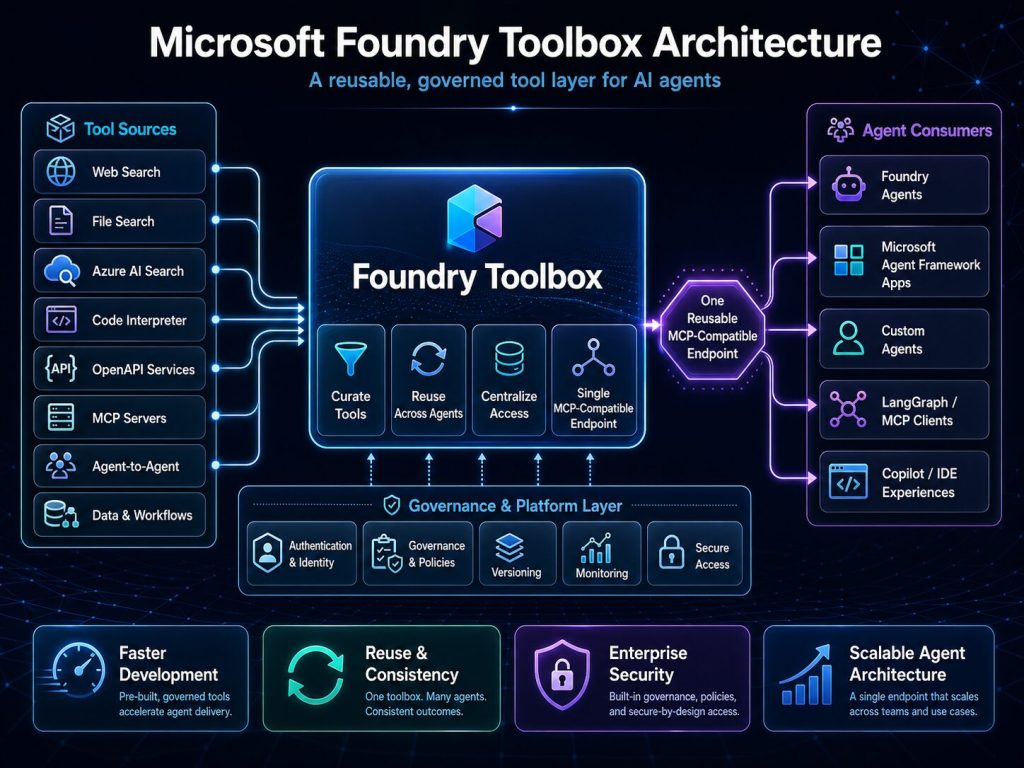
Before Foundry Toolbox, every agent could easily become its own custom integration project.
One agent connects to Azure AI Search one way.
Another connects to GitHub another way.
Another uses a custom OpenAPI service.
Another stores credentials differently.
Another team builds the same integration again because they did not know it already existed.
That approach does not scale.
It creates several problems:
- Duplicate engineering work
- Inconsistent security
- Hard-to-maintain integrations
- Repeated authentication logic
- Lack of centralized visibility
- Difficulty updating tools across many agents
Foundry Toolbox helps by separating the agent from the tool plumbing.
The agent focuses on its job. The toolbox manages the approved tools it can use. That is a much better enterprise architecture.
The Four Key Ideas Behind Foundry Toolbox
Microsoft frames Toolboxes around four major ideas: Discover, Build, Consume, and Govern.
1. Discover
As companies build more agents, they will also create more tools. Developers need a way to find approved tools instead of rebuilding the same integrations over and over again. Discovery helps organizations turn tools into reusable enterprise assets.
2. Build
This is where you create a toolbox and add tools to it.
A toolbox can include Microsoft built-in tools such as Web Search, Code Interpreter, File Search, and Azure AI Search. It can also include protocol-based tools such as MCP, OpenAPI, and agent-to-agent tools.
This flexibility is important because real enterprise agents usually need a mix of knowledge tools, data tools, workflow tools, and action tools.
3. Consume
Once a toolbox is published, agents can consume it through a single MCP-compatible endpoint. That is a very important design choice.
It means an agent does not need to be wired directly to every individual tool. The agent connects to the toolbox, and the toolbox exposes the approved capabilities.
This also means the toolbox is not only useful for one kind of agent. Microsoft’s announcement makes it clear that Toolboxes are “Foundry-homed, not Foundry-bound.” In other words, you manage the toolbox in Foundry, but MCP-compatible agents outside Foundry can also use it.
That makes it more useful in real companies where different teams may use different agent frameworks.
4. Govern
Governance is where this becomes especially important for enterprises.
Companies need to control:
- Which agents can use which tools
- Which users can trigger which actions
- How credentials are managed
- How tools are updated
- How usage is monitored
- How risky or outdated tools are removed
Foundry Toolbox is designed to become a central governance point for agent tools. That is critical because unmanaged tool access can quickly become a security and compliance problem.
Why MCP Compatibility Is Important
One of the strongest parts of Foundry Toolbox is that it uses an MCP-compatible endpoint.
MCP, or Model Context Protocol, is becoming an important standard for connecting AI systems to tools and data sources.
By supporting MCP, Microsoft is making Toolboxes more open and flexible. Companies are not forced to use only one framework or runtime. A toolbox managed in Foundry can potentially be used by agents built with Microsoft Agent Framework, custom code, LangGraph, N8N, FlowiseAI, developer tools, or other MCP-compatible systems.
That matters because enterprise AI will rarely be built with one tool only.
Different teams will use different approaches. What companies need is a common, governed way to expose tools to those agents.
Foundry Toolbox helps provide that layer.
A Simple Example: Customer Support Agent
Imagine your company wants to build a customer support agent.
The agent needs to:
- Search product documentation
- Review internal troubleshooting guides
- Analyze uploaded customer files
- Create support tickets
- Escalate difficult cases to a human
- Check GitHub issues or product bugs
Instead of wiring each of these capabilities directly into the support agent, your team creates a Customer Support Toolbox.
That toolbox contains the approved tools for support scenarios.
Now, multiple agents can use it:
- Tier 1 support agent
- Internal support assistant
- Escalation triage agent
- Product support analyst
- Customer success agent
They all benefit from the same approved and maintained tool layer.
If the company updates the ticketing API or adds a new documentation search tool, the toolbox can be updated centrally instead of changing every single agent.
That is the power of this architecture.
Why Companies Should Care
Foundry Toolbox is valuable because it helps organizations move from isolated AI experiments to scalable AI platforms.
It gives companies a better way to:
Move faster
Developers can reuse approved tools instead of rebuilding integrations.
Improve security
Authentication and tool access can be managed more centrally.
Reduce duplication
Common tools can be packaged once and shared across many agents.
Increase consistency
Agents can use the same tool definitions and approved access patterns.
Support governance
Companies can better control which tools are available and how they are used.
Enable multi-agent architecture
Different agents can share common capabilities while still serving different business functions.
This is exactly what companies need when they start building more than one or two agents.
Lino’s Take
Foundry Toolbox may not sound as exciting as a new AI model, but it may be more important for companies trying to build practical, production-ready AI agents.
Models are important, but tools are what make agents useful.
Without tools, agents can talk. With tools, agents can act.
But action requires control. Companies need a way to decide which tools agents can use, how those tools are secured, how they are reused, and how they are governed. That is why Foundry Toolbox matters.
It helps create a clean tool layer for enterprise AI agents. It reduces integration chaos. It supports reuse. It improves consistency. And it gives organizations a path toward stronger governance.
For companies serious about building AI agents, this is a technology worth watching closely and experimenting with now.
At The Training Boss, we stand ready to partner with your organization to Architect, Implement, Train your team and reach your desired success, reach us today
Thank you for reading this post. As a small token of gratitude, please use the coupon “blog30” to receive 30% off the latest Microsoft Agent Framework Video course