
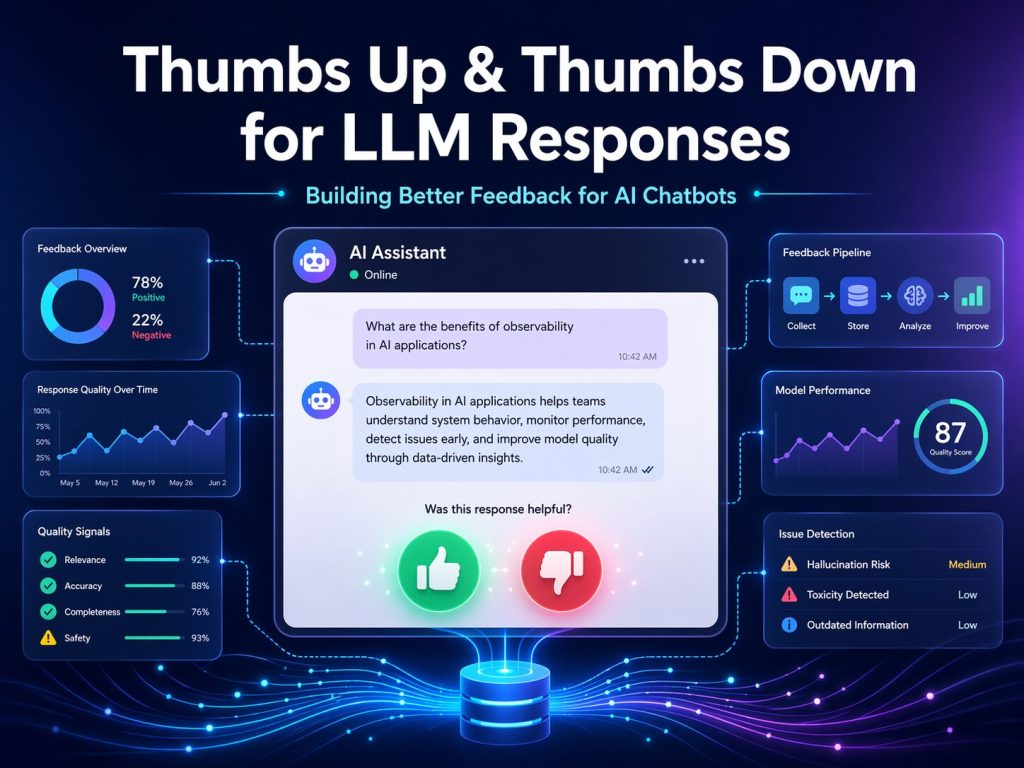
As more organizations deploy AI chatbots and copilots, one simple feature keeps showing up in the user interface: the familiar thumbs up and thumbs down buttons.
At first glance, this seems like a small UX detail. Add two buttons, store whether the answer was liked or disliked, and move on.
But in practice, a good feedback system for LLM responses is much more than that.
If you want your AI solution to improve over time, catch regressions, identify hallucinations, detect tool failures, and understand whether users are actually getting value, then thumbs up and thumbs down should be treated as a full feedback and observability system, not just a couple of icons on the screen.
In this post, I want to walk through what it really takes to implement this feature properly.
Why Thumbs Up / Down Matters
When users interact with an AI chatbot, every response is a chance to learn something:
- Was the answer correct?
- Was it useful?
- Did it follow instructions?
- Was it too long or too vague?
- Did it cite sources well?
- Did it fail because retrieval was weak?
- Did a tool call break behind the scenes?
A simple feedback mechanism gives users a fast way to tell you whether the response helped. That is valuable. But the real value appears when that signal is captured with enough surrounding context to make it actionable.
A bare thumbs down tells you someone was unhappy.
A well-designed feedback event tells you why, under what conditions, and what to fix.
The Biggest Mistake Teams Make
The most common mistake is implementing thumbs up/down like this:
- render buttons
- store
liked = trueorfalse - maybe display a thank-you message
That is easy to build, but it provides very little operational value.
It does not tell you:
- which model produced the bad answer
- what prompt version was active
- whether RAG was used
- which documents were retrieved
- whether a tool call failed
- whether the response took 12 seconds and annoyed the user
- whether the same issue is happening hundreds of times
If you want feedback that improves your AI product, you need to think bigger.
The Right Way to Think About It
A production-ready thumbs system has two layers:
1. A simple and frictionless user experience
Users should be able to click quickly without interrupting their workflow.
2. A rich backend feedback pipeline
The click should be tied to the exact response, trace, model, prompt, and execution details that produced it.
That combination is where the magic happens.
Start with the User Experience
For each assistant response, show:
- 👍 Helpful
- 👎 Not Helpful
That is the core interaction. Then, once the user clicks, optionally invite more detail.
After a thumbs up
You can ask:
- What was good about it?
- Correct
- Clear
- Fast
- Useful
- Good citations
After a thumbs down
You can ask:
- What went wrong?
- Incorrect
- Hallucinated or made things up
- Did not follow instructions
- Bad tone
- Too long or too short
- Missing sources
- Slow
- Tool or action failed
- Other
And then provide a small comment box:
Tell us more
This is an important design choice. A simple thumb is helpful, but a structured follow-up gives you the reason behind the rating. That is what turns raw sentiment into something the engineering team can act on.
Every Response Needs a Unique Identity
To make feedback meaningful, each assistant response should already have identifiers such as:
- Conversation ID
- Turn ID
- Message ID
- Response ID
- Trace ID
When a user clicks thumbs up or thumbs down, the feedback event must reference those identifiers.
That way, you can link the feedback back to the exact response and everything that happened around it.
Without this, feedback becomes disconnected and much harder to analyze.
The Best Architecture Pattern
A strong implementation usually looks like this:
Frontend
The chat UI renders the thumbs controls on every assistant message.
When the user clicks, the frontend sends a feedback payload to the backend.
Backend API
A dedicated endpoint receives the feedback, validates it, and stores it.
Database
Feedback is stored in a dedicated table, not buried inside the chat transcript.
Telemetry
A custom event is emitted so feedback can be correlated with traces, logs, and metrics.
Analytics and evaluation
Offline processes aggregate the feedback into dashboards and evaluation datasets.
This turns thumbs up/down from a superficial interface feature into a real product improvement loop.
What the Feedback Payload Should Contain
A strong feedback event should include fields like:
- conversationId
- turnId
- messageId
- responseId
- traceId
- rating (
upordown) - reason codes
- optional comment
- user ID or tenant ID
- timestamp
That alone is a major improvement over simply storing “liked” or “disliked.”
What Else You Should Capture
The feedback event becomes far more valuable when you can correlate it with response metadata such as:
Response metadata
- model name
- model version
- deployment name
- prompt template version
- token counts
- latency
- streaming vs non-streaming
Retrieval metadata
- retrieved document IDs
- chunk count
- similarity scores
- whether citations were shown
Tool metadata
- tool calls made
- success or failure of each tool
- latency per tool
- fallback path used
Safety and execution metadata
- moderation flags
- retry count
- truncation status
- error conditions
Once you have this, you can answer questions like:
- Are thumbs down increasing after a model upgrade?
- Are hallucination complaints tied to specific prompts?
- Do tool failures correlate with user frustration?
- Are slow answers getting penalized even when correct?
That is where feedback becomes genuinely powerful.
Why a Dedicated Feedback Table Matters
Do not just append thumbs data to the message content.
Store it in a separate structure.
For example, you might have one table for assistant messages and another for message feedback.
The assistant message record stores the response and all its execution details.
The feedback record stores:
- who rated it
- whether it was up or down
- what reasons were selected
- what comment was provided
- when it happened
This separation makes reporting, filtering, auditing, and analytics much easier.
One Rating per User per Message
A simple best practice is to allow one feedback record per user per message, with the option to update it. That avoids spam and keeps your data cleaner. It also lets a user change their rating later if they want to.
Why Observability Matters
If your chatbot is in production, you should not treat thumbs feedback as only a database concern. It should also be part of your telemetry story. When feedback is submitted, emit a custom event such as:
chat.feedback.submitted
Attach useful dimensions such as:
- rating
- reason codes
- message ID
- trace ID
- model
- model version
- prompt version
- latency
- tool count
- retrieval source count
This lets you use observability dashboards to spot trends and investigate incidents quickly.
For example, if a new deployment causes a jump in thumbs down, you want to detect that fast.
The Most Important Insight: Thumbs Are Not Just UX, They Are Labels
A good thumbs system creates valuable labels for your AI lifecycle.
Those labels can feed three important loops:
1. Product improvement loop
You can identify usability issues such as:
- bad formatting
- weak citations
- excessive verbosity
- poor tone
- slow responses
2. Prompt engineering loop
You can review negative feedback by:
- model version
- prompt version
- task type
- tool usage
- retrieval path
This helps refine system prompts, grounding strategy, and orchestration logic.
3. Evaluation loop
Downvoted responses can be turned into test cases for future regression testing.
That means your real user feedback becomes part of your quality engineering process.
This is one of the smartest things an AI team can do.
What a Good Minimal Version Looks Like
If you want a practical first version, build this:
- thumbs up/down on every assistant message
- optional comment for thumbs down
- dedicated feedback API
- feedback table in the database
- message ID and conversation ID correlation
That gives you a usable starting point.
What a Good Production Version Looks Like
A mature implementation adds:
- structured reason codes
- trace ID correlation
- model and prompt version tracking
- retrieval and tool metadata
- telemetry events
- dashboards
- quality reviews
- regression test case generation from bad answers
That is where the feature goes from “nice to have” to “strategic.”
Final Recommendation
If you are building an AI chatbot today, my recommendation is simple:
Do not implement thumbs up and thumbs down as just a couple of buttons.
Implement them as a feedback architecture.
- Make the user experience effortless.
- Capture structured reasons when possible.
- Tie the rating to the exact response and execution trace.
- Store it cleanly.
- Monitor it operationally.
- And use it to improve prompts, models, tools, and overall experience.
When done right, this small feature becomes one of the most valuable sources of truth in your AI application.
It helps you see what users trust, what they reject, and what needs attention next.
And in the world of LLM-powered solutions, that feedback loop is not optional. It is essential.
Reach out to us at the Training Boss to partner together on AI solutions. We are happy to architect and implement your Thumbs Up & Down solution.
1 thought on “Thumbs Up & Down for LLM Responses”
Pingback: Dew Drop – April 24, 2026 (#4654) – Morning Dew by Alvin Ashcraft
Comments are closed.